


charlimero
Participant
December 22, 2018
Answered

Camera RAW [Unable to open Fujifilm X-T20 Raw files in PSE 13 or Photoshop CS6]

  • December 22, 2018
  • 1 reply
  • 2748 views

Bonjour,

En tant que novice je suis partiellement déçu.

J' utilisais régulièrement "Ps Elements 13" et l'adon Camera RAW  sans soucis particulier, jusqu'au jour ou l'idée d'une mise à jour de Camera RAW m'a titiller afin d'être compatible avec les nouveaux fichiers RAF, fujifilm XT20 .

Mal m'en a prit, depuis ce logiciel (Camera RAW) ne fonctionne plus et m'envoie ceci: Bien qu'ayant suivit la lien et procédé à la mise à jour, rien...
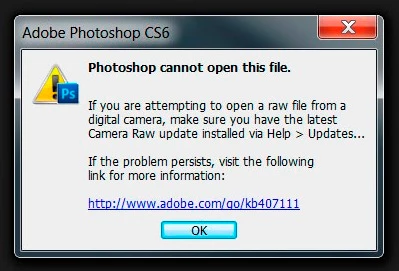
J'ai bêtement penser qu'avec le passage à Ps CS6, le problème serait miraculeusement résolu,

Mais non, bien que j'ai chargé la version CR compatible avec Ps CS6.

Donc! Si l'un d'entre vous avais (comme cadeau de Noël) une solution...

Genre: où aller pour supprimer l'ancien fichier qui m'embête.

Mon nettoyeur habituel, "CCleaner" ne trouve pas cet exécutable.

Ps: Win 7 (64) à jour.

Bonne journée.

    This topic has been closed for replies.
    Correct answer Per Berntsen

    As a novice I'm partly disappointed.

    I was regularly using "Ps Elements 13" and the adon Camera RAW without particular worries until the day or the idea of a Camera RAW update has me Tickle in order to be compatible with the new RAF, fujifilm XT20 files.

    Bad I took, since this software (Camera RAW) no longer works and sent me this: though having followed the link and update, nothing...

    I stupidly thinking that with the transition to Ps CS6, the problem would be miraculously solved.

    But no, although I loaded the CR version compatible with Ps CS6.

    So! If one of you had a solution (as a Christmas gift)...

    Genre: where to go to delete the old file that has bothered me.

    My usual cleaner, "CCleaner" can't find this executable.

    PS: Win 7 (64) to date.

    The Fujifilm X-T20 requires at least version 9.9 of the Camera Raw plugin. (see Cameras supported by Camera Raw )

    The latest version available for CS6 is 9.1.1.

    You can download and install the free DNG converter, which will convert the raw files to DNG files, which you can open in CS6.

    See Adobe Digital Negative Converter

    You can also subscribe to the Creative Cloud Photography plan, which includes the latest version of Photoshop, and will let you import the raw files directly.

    1 reply

    Per Berntsen
    Community Expert
    Per BerntsenCommunity ExpertCorrect answer
    Community Expert
    December 22, 2018

    As a novice I'm partly disappointed.

    I was regularly using "Ps Elements 13" and the adon Camera RAW without particular worries until the day or the idea of a Camera RAW update has me Tickle in order to be compatible with the new RAF, fujifilm XT20 files.

    Bad I took, since this software (Camera RAW) no longer works and sent me this: though having followed the link and update, nothing...

    I stupidly thinking that with the transition to Ps CS6, the problem would be miraculously solved.

    But no, although I loaded the CR version compatible with Ps CS6.

    So! If one of you had a solution (as a Christmas gift)...

    Genre: where to go to delete the old file that has bothered me.

    My usual cleaner, "CCleaner" can't find this executable.

    PS: Win 7 (64) to date.

    The Fujifilm X-T20 requires at least version 9.9 of the Camera Raw plugin. (see Cameras supported by Camera Raw )

    The latest version available for CS6 is 9.1.1.

    You can download and install the free DNG converter, which will convert the raw files to DNG files, which you can open in CS6.

    See Adobe Digital Negative Converter

    You can also subscribe to the Creative Cloud Photography plan, which includes the latest version of Photoshop, and will let you import the raw files directly.

    charlimero
    Participant
    December 22, 2018

    Bonjour et merci beaucoup pour votre rapide réponse.

    Je dois vous préciser que depuis la mise à jour dont il est question, plus

    aucun fichier bruts, RAW, NEF ou autre ne peuvent êtres pris en

    compte. Car *Camera

    RAW ne s'ouvre plus *... oups!

    J'en déduis qu'il ne s'agit pas seulement d'un problème de version.

    Qu'en pensez-vous?

    ps: si possible je ne souhaite pas utiliser le cloud. (personnel)

    Salutations.

    Le sam. 22 déc. 2018 à 15:34, Per Berntsen <forums_noreply@adobe.com> a

    écrit :

    Camera RAW [Unable to open Fujifilm X-T20 Raw files in PSE 13 or Photoshop

    CS6] created by Per Berntsen

    <https://forums.adobe.com/people/Per+Berntsen> in Adobe Camera Raw - View

    the full discussion <https://forums.adobe.com/message/10829867#10829867>

    Per Berntsen
    Community Expert
    Community Expert
    December 22, 2018

    Hello and thanks a lot for your quick response.

    I must tell you that since the update in question, more

    No file raw, RAW, NEF, or otherwise cannot be taken into

    account. Because * Camera

    RAW no longer opens *... Oops!

    I assume that it is not only a problem of version.

    What do you think?

    The dialog above will appear if the camera is not supported by Camera Raw.

    If it also appears with files from cameras that should be supported, you can download the latest version of Camera Raw from here: Camera Raw plug-in installer  Scroll down to version 9.1.1

    What camera do the NEF files come from?

    In any case, the only way to open the X-T20 files in CS6 is to use the DNG converter.

    PS: if possible do not use the cloud.

    Creative Cloud applications are installed locally on your computer, and your files are stored locally on your computer.

    It's just like using CS6.