


Can't scroll down in ACR to see all sections for image processing.
I mainly prefer to use Bridge, Photosho, and ACR for photography (over Lightroom) however this bug has been an issue for months now and quite annoying. Basically, I simply can't scroll down do see all sections like Detail and Optics. If I minimize all sections then click to open Calibration, I can only see Red Primary, and can't scroll down to green. It doesn't matter if I am in full screen or window mode, and even in Masking, the same scrolling issue happens. In Masking, if I have Light and Color and Effects expanded, it doesn't show me all of the Effects section.
I am on a PC with Windows 11 and have 3 monitors, dual side by side and a small monitor below. Not sure if that is the reason for the glitch, but even if I open ACR in the small lower monitor it still doesn't scroll down enough, as you can see in this screenshot (below).
Again, this has been happening for months now and not yet fixed. It is quite annoying, and so I have been using Lightroom instead for many projects.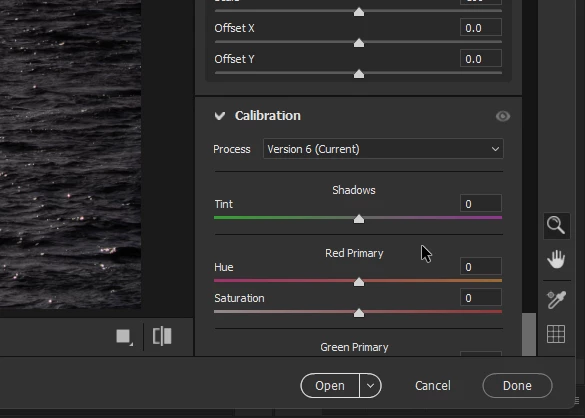
 AdChoices