


John_jcb
Participating Frequently
July 3, 2018
Answered

Cannot Create New Profile in ACR

  • July 3, 2018
  • 1 reply
  • 588 views

I am using the latest Version of Photoshop and ACR. I reinstalled this AM.

Using Win 10 when I Alt Click on the Profiles button. I do not get the Create New Profile Window. Any ideas? I tried a number of different combinations of alt and ctrl and nothing worked.

I am trying to save some .cube files I have for different movie looks so I can apply them in Lightroom. I can apply them in PS using the Color Lookup Adjustment.

    This topic has been closed for replies.
    Correct answer Jeff Arola

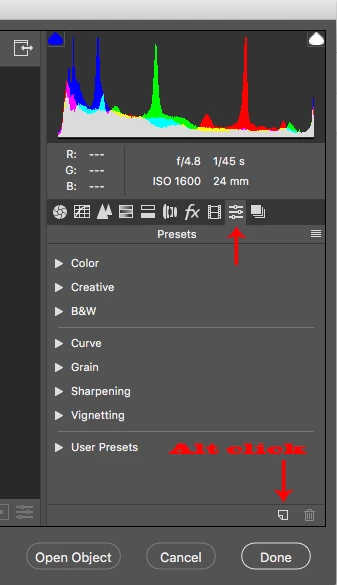
    Go to the Presets tab and Alt click (Option on Mac) on the New Preset icon.

    There is a Profiles SDK (April 2018) here that has info for creating enhanced profiles.

    Digital Negative (DNG), Adobe DNG Converter | Adobe Photoshop CC

    1 reply

    Jeff Arola
    Community Expert
    Jeff ArolaCommunity ExpertCorrect answer
    Community Expert
    July 3, 2018

    Go to the Presets tab and Alt click (Option on Mac) on the New Preset icon.

    There is a Profiles SDK (April 2018) here that has info for creating enhanced profiles.

    Digital Negative (DNG), Adobe DNG Converter | Adobe Photoshop CC