minaux
Participant
May 6, 2017
Answered

copying settings from one snapshot to another

  • May 6, 2017
  • 1 reply
  • 457 views

Hi there,

I was just wondering if there's a way to select all spot removal edits and copy and paste them to a different snapshot of the same image? As you might have guessed, I edited the wrong snapshot and would like to save some time if possible! (Everything else about Shapshot 'B' is right, it's only the spot removal I want to add from Snapshot 'A' - so I don't think I want to 'merge' snapshots because the other edits in Snapshot A have been improved in Snapshot B.)

Thanks for your help

    This topic has been closed for replies.
    Correct answer Chuck Uebele

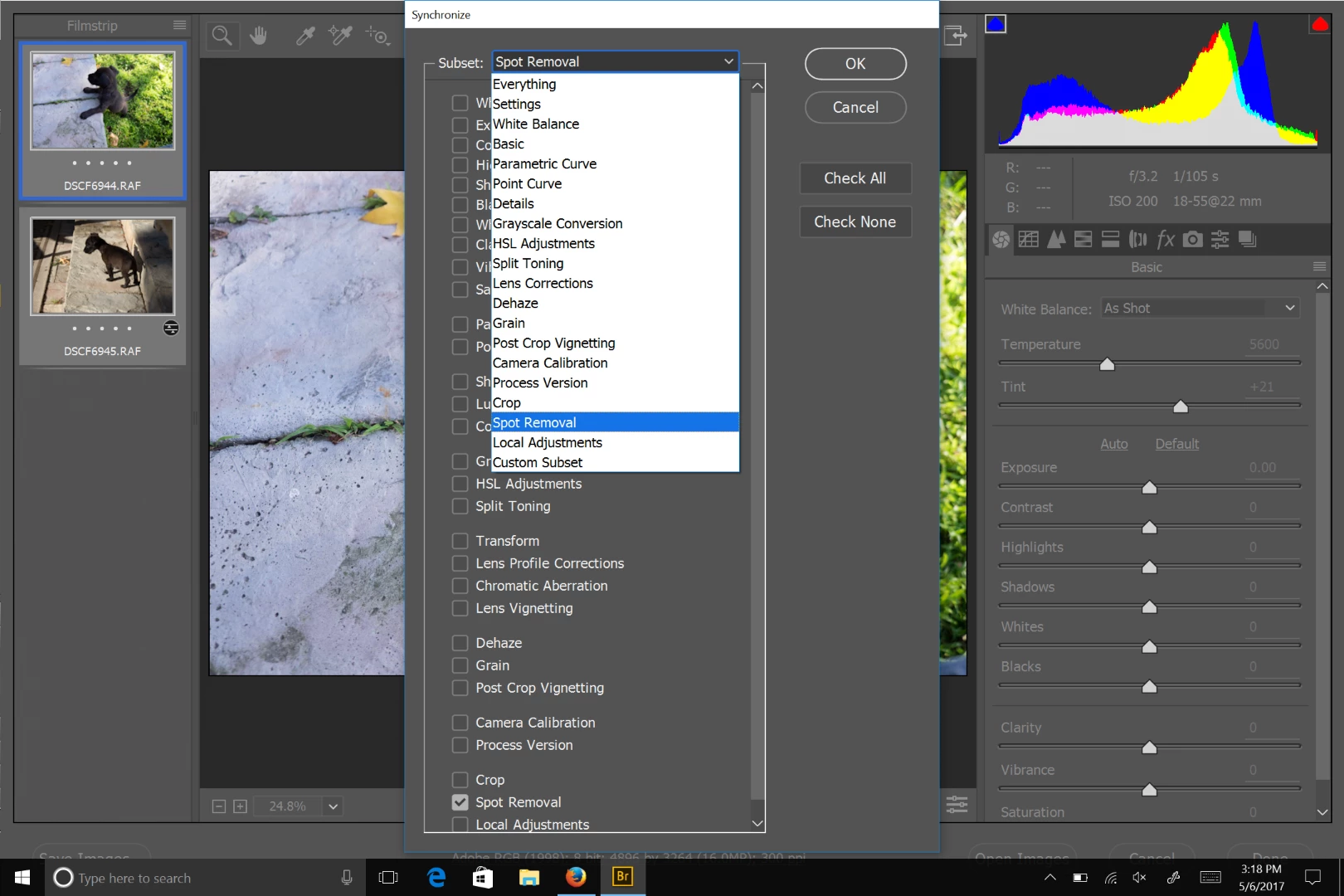
    Open the two files, select the one you made all the corrections to, then select the one you want the spot healing brushes applied to. Use sync settings and select just spot removal.

    1 reply

    Chuck Uebele
    Community Expert
    Chuck UebeleCommunity ExpertCorrect answer
    Community Expert
    May 6, 2017

    Open the two files, select the one you made all the corrections to, then select the one you want the spot healing brushes applied to. Use sync settings and select just spot removal.

    minaux
    minauxAuthor
    Participant
    May 6, 2017

    Brilliant, thank you! (Since they were snapshots of the same file, I saved one snapshot as a separate .dng so I could open both and sync.)