Known Participant
November 5, 2025
Answered

Crop and Expand tool is missing

  • November 5, 2025
  • 1 reply
  • 104 views

I just saw a presentation in the Photoshop Summit 7, where somebody showed the Crop and Expand option in Camera Raw. I do not have that tool and can't find it. I am opening files directly into PS (not from within PS as a layer) by using FILE-OPEN, these are Nikon .NEF raw files and the crop tool does not show any option or check box for crop and expand. See attachment


The demo was done in PS 2025 and CR 17.5.1 (2md attachment) - was that option removed?


Camera Raw 18, PS 2026 on Win 11

Correct answer Rikk Flohr_Photography

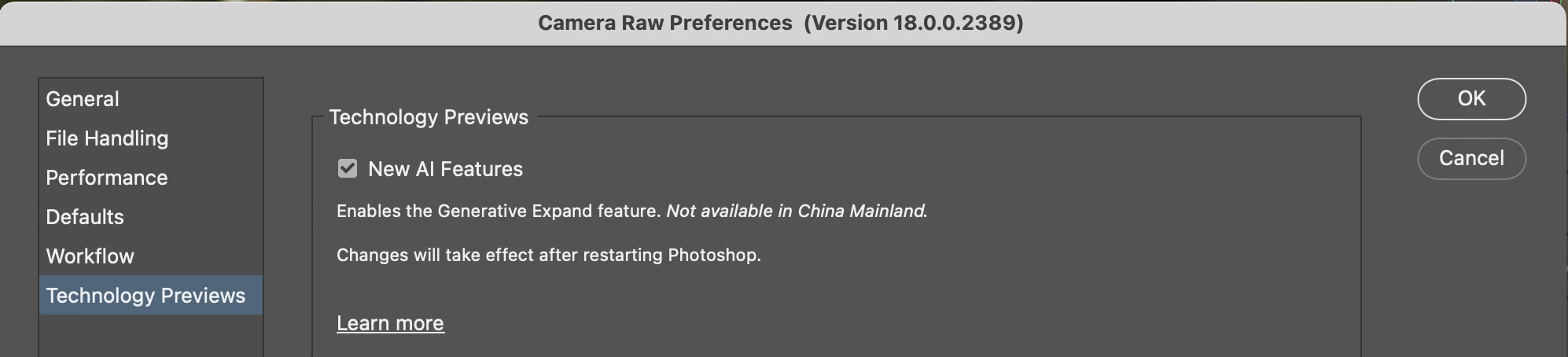
Have you enabled the feature in Preferences? 

1 reply

Rikk Flohr_Photography
Community Manager
Community Manager
November 5, 2025

Have you enabled the feature in Preferences? 

Rikk Flohr: Adobe Photography Org
JLobertAuthor
Known Participant
November 5, 2025

Thank you.That did it. I didn't know there were preferences within Camera Raw. 🙂


Rikk Flohr_Photography
Community Manager
Community Manager
November 5, 2025

That is the Photoshop Preferences. The option is in Camera Raw Preferences. Click the Gear in the upper right of the Camera Raw interface to access. 

Rikk Flohr: Adobe Photography Org