lfink9
Participant
October 3, 2018
Answered

CS6 Adobe Raw Paintbrush working in opposite way

  • October 3, 2018
  • 1 reply
  • 376 views

We use CS6 at the studio, and I am having major issues with the paintbrush making everything darker instead of lighter, or making the file very muddy, even though it shouldn't according the way the adjustment panel looks.  Has anyone had this issue?  Trying an update now to see if that helps the situation.

    This topic has been closed for replies.
    Correct answer Akash Sharma

    Hi lfink9,

    Sorry that you're having trouble using the Brush tool in Photoshop CS6.

    As you've mentioned that you're going to apply an update and see if that makes any difference. If that does not help, try resetting the brush tool.

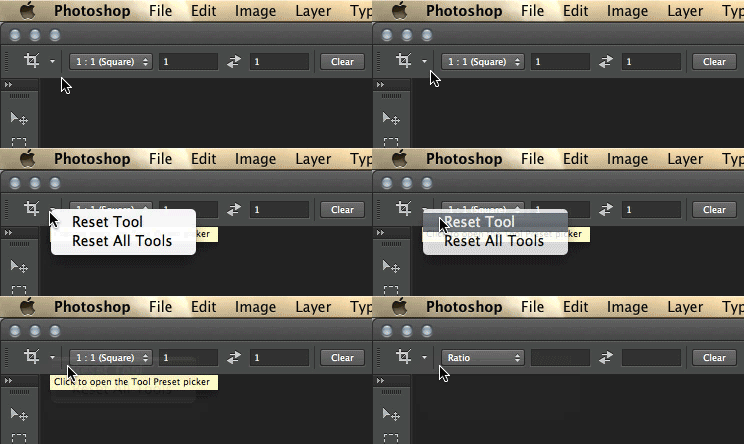
    Choose 'Reset Tool' to fix unexpected results when using a tool

    Refer the below-linked article for steps to reset the tool:

    Basic troubleshooting steps to solve problems and issues in Adobe Photoshop CC

    Thanks,

    Akash

    1 reply

    Akash Sharma
    Akash SharmaCorrect answer
    Legend
    October 3, 2018

    Hi lfink9,

    Sorry that you're having trouble using the Brush tool in Photoshop CS6.

    As you've mentioned that you're going to apply an update and see if that makes any difference. If that does not help, try resetting the brush tool.

    Choose 'Reset Tool' to fix unexpected results when using a tool

    Refer the below-linked article for steps to reset the tool:

    Basic troubleshooting steps to solve problems and issues in Adobe Photoshop CC

    Thanks,

    Akash