


janetm62681729
Known Participant
April 29, 2023
Answered

DENOISE in latest Camera RAW

  • April 29, 2023
  • 4 replies
  • 4307 views

on mac monterey 12.6.5.  lastest camera RAW takes away normal noise control sliders and adds "DENOISE" which not only just hangs and doesnt work... what is this and why would adobe take away the normal sliders in RAW. if i want auto controls i will use jpg. please advise. i wasted 3 hours of work time. support people were of no help. had to downgrade... please advise

Correct answer D Fosse

i have 20 GB of RAM since i work in RAW.  the original question remains -why change something we have been using for 10+ (maybe 20 years)!   i dont' want to test it again at this moment because i cannot afford any computer crash this week.  how do i check that the GPU is up to date? there are no updates for me in Mac OS...

quotewhy change something we have been using for 10+ (maybe 20 years)!

By @janetm62681729


Nothing in manual noise reduction has changed. You can continue using it just as you have been, and ignore Denoise.


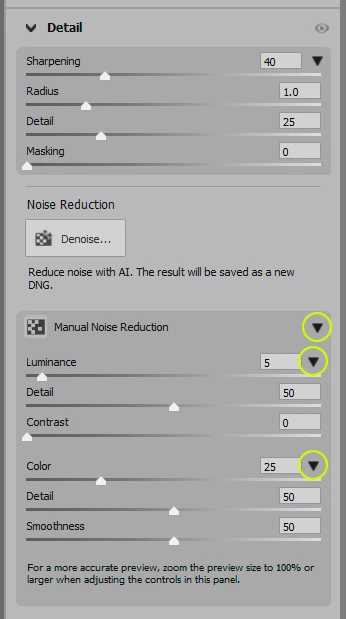
The only change is that manual noise reduction has been tucked away into a sub-panel that you have to open, and then you need to click the arrows to expand the full set of parameters.


Once you've done that, it sticks and you won't have to think about it again.

4 replies

Participating Frequently
June 27, 2025

What on earth have adobe done to denoise in Photoshop 2025 - uploaded the upgrade two days ago and it has destroyed several of my photos - randomply it just mulches them as the attached image shows - what an utter diasaster - please please fix things and stop the recent upgrade which is a disaster!

Participating Frequently
June 27, 2025

This how the denoised file looks on my PC - I can't get back to the original and photoshop seems to have destroyed it!

Rikk Flohr_Photography
Community Manager
Community Manager
June 27, 2025

You’ve posted to an ancient thread. It is highly unlikely that the issue described in this thread, though not impossible, is the same one you are currently experiencing. Rather than resurrect an old thread that is seemingly similar, you are better off posting to a new thread with fresh, complete information, including system information, a complete description of the problem, and step-by-step instructions for reproduction. 


If the issue is the same, we will merge you back into the appropriate location. 

This thread will be locked. 


Thank you!


Rikk Flohr: Adobe Photography Org
Woody76
Participant
June 15, 2023

I'm not sure why there is a ( DeNoise AI ) button if you have to manually adjust from the dropdown arrow?

D Fosse
Community Expert
Community Expert
June 15, 2023

What we're saying is that if you don't want to use the AI option, the old manual noise reduction is still there and hasn't changed.

janetm62681729
Known Participant
June 18, 2023

the Denoise takes up screen space and now i have to scroll up an down on every photo. RAW is for user processing, if you want auto corrections use jpg. they need to make the side menu more customizable.

janetm62681729
Known Participant
April 29, 2023

hi jeff sorry i didn't explain correctly. i don't find the LUMINENCE to be as sensitive as the old menu. also DENOISE doesn't even work and takes up space on menu (by the way-it that customizable?) but WHY would they remove a manual control and put an auto one in RAW processing?

TheDigitalDog
Inspiring
April 29, 2023

Nothing new with the old Detail functionality. 

What do you mean DENOISE doesn't even work? We can't help until we have more data. 

Nothing was removed. A new AI NR was added. 

This should all be discussed (moved) to the Adobe Camera Raw forum as well. 

Author “Color Management for Photographers" & "Photoshop CC Color Management/pluralsight"
janetm62681729
Known Participant
April 29, 2023

it just spins and never renders an image...   yes the old noise reduction tools are removed see previous photo. i will check the camera raw forum

Jeff Arola
Community Expert
Community Expert
April 29, 2023

Adobe didn't remove the normal noise control sliders, they are just somewhat hidden.

Click on the little arrows highlighted in the screenshot below