


Participating Frequently
June 29, 2020
Answered

Detail masking no longer available in 12.3

  • June 29, 2020
  • 1 reply
  • 490 views

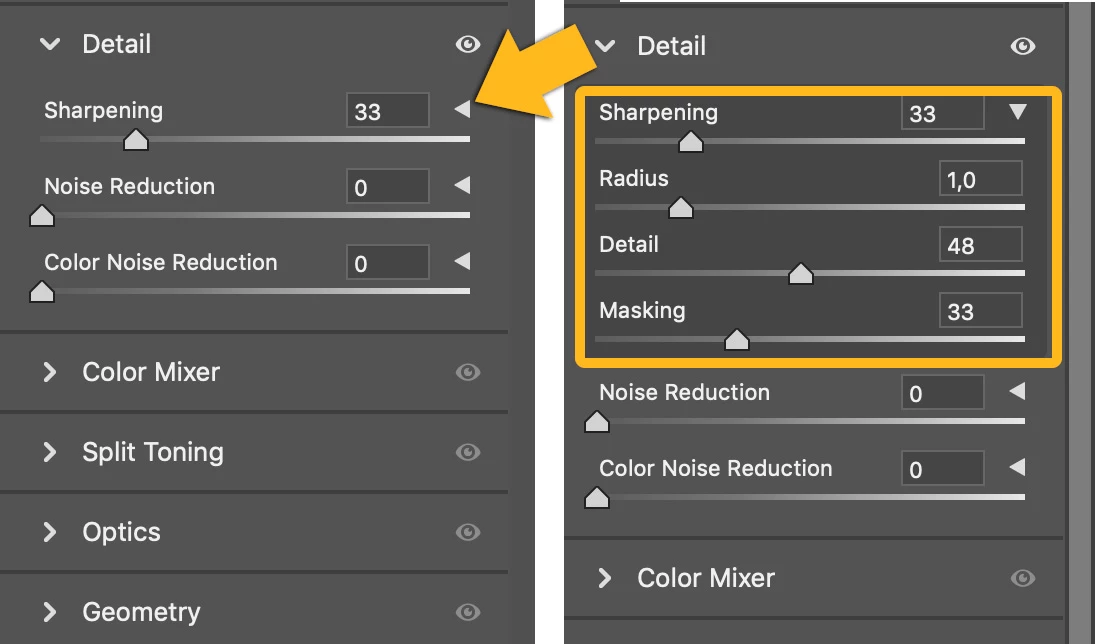
I have just switched over to 12.3 and one of the first things I have noticed is that the ability to mask how sharpening is applied appears to be gone. In the previous versions of ACR you could adjust the details mask to remove pretty much all of the picture apart from the highest contrast edges from being affected by the sharpening, with the advantage that sharpening could then be heavily boosted in just those areas with zero impact on the rest of the image. It created more pop with a more natural image. That facility is gone. In fact there is literally just a sharpness slider with no options to adjust threshold or radius let alone the mask. Any ideas? Are these controls no longer required? Is sharpening on 12.3 massively more advanced than before?

This topic has been closed for replies.
Correct answer Marianne-Deiters

You have to expand the options by clicking on the small triangle.

1 reply

Marianne-Deiters
Marianne-DeitersCorrect answer
Participating Frequently
June 30, 2020

You have to expand the options by clicking on the small triangle.

MiserieAuthor
Participating Frequently
June 30, 2020

Now I feel like a prat! Thank you. No idea why I did not notice those triangles before. Although when I went to Adobe support and used the chat to talk to an advisor, the advice I got give was to rollback to 11.4 - not Adobe's finest moment!


Thank you Marianne - I appreciate it.

Marianne-Deiters
Participating Frequently
June 30, 2020

Thank you for your nice feedback - it takes some getting used to at the beginning