Participating Frequently
October 7, 2017
Answered

dialog box popup how to stop these?

  • October 7, 2017
  • 1 reply
  • 1251 views

[Personal info removed by Mod]

    This topic has been closed for replies.
    Correct answer Jeff Arola

    Looks like your using photoshop cs6 on macOS High Sierra?

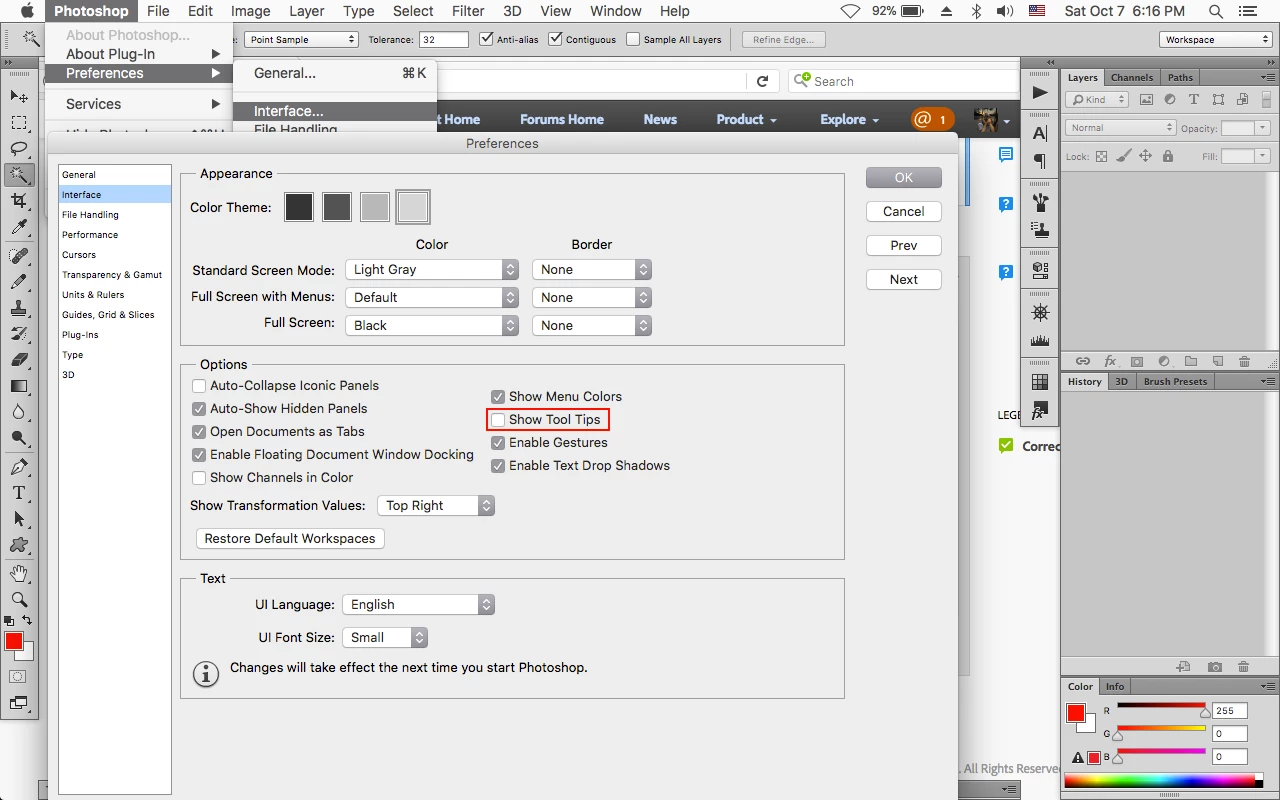
    You can go to Photoshop>Preferences>Interface, uncheck Show Tool Tips and then restart photoshop.

    1 reply

    Jeff Arola
    Community Expert
    Jeff ArolaCommunity ExpertCorrect answer
    Community Expert
    October 7, 2017

    Looks like your using photoshop cs6 on macOS High Sierra?

    You can go to Photoshop>Preferences>Interface, uncheck Show Tool Tips and then restart photoshop.

    namesiwAuthor
    Participating Frequently
    October 8, 2017

    Thank You,

    lavon wiseman

    wisemanlavon@gmail.com