


Participant
February 17, 2017
Answered

Discombobulated picture, misplaced pieces!

  • February 17, 2017
  • 1 reply
  • 350 views

Hi all,

This has been happening a lot to me recently.

When moving a slider, the pictures shakes and jerks (not really sure what the correct terminology should be).

It happens both in LR and ACR, and basically, when in LR, it feels like it flashes the unedited version of the picture, before I made adjustments. When in ACR, the picture gets sliced and replaced by other part of what's on screen!

Any help or feedback would be appreciated!
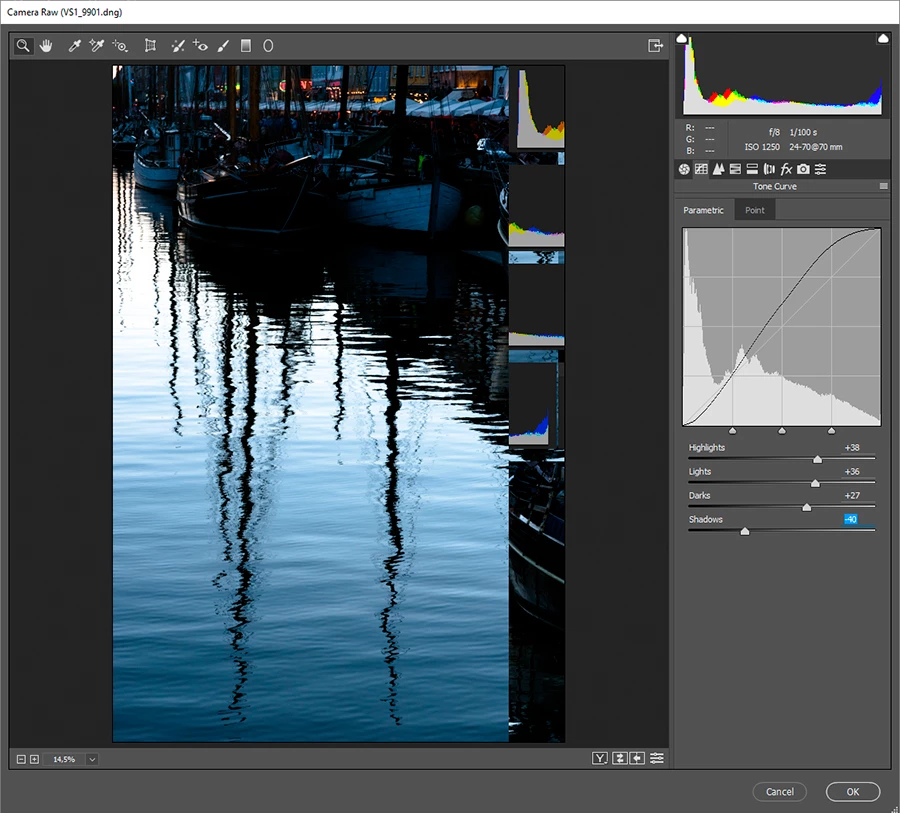
Win10-64 bit

4GB RAM

Nvidia 750ti 2GB

All LR, PS, and ACR are up to date

This topic has been closed for replies.
Correct answer JP Hess

These problems are often caused by a graphics driver that is out of date or incompatible. You might want to see if there is an update for your graphics card that will solve the problem. If there isn't then you could try turning off GPU support at the bottom of your Camera Raw preferences in Bridge:

1 reply

JP Hess
JP HessCorrect answer
Inspiring
February 17, 2017

These problems are often caused by a graphics driver that is out of date or incompatible. You might want to see if there is an update for your graphics card that will solve the problem. If there isn't then you could try turning off GPU support at the bottom of your Camera Raw preferences in Bridge:
