


Participant
September 23, 2017
Question

DNG Converter making NEF image notably darker

  • September 23, 2017
  • 4 replies
  • 2722 views

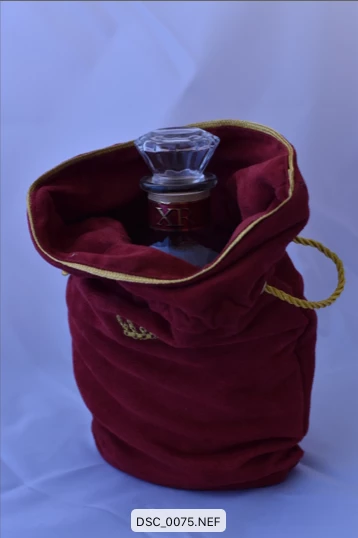
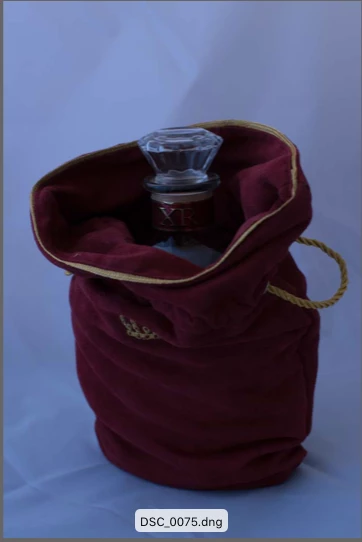
Hello! I recently got a Nikon d5500, only to find that the Raw file type won't work with Lightroom 5 which is all I can afford right now. So I used the Adobe Digital converter to turn them into DNGs so I could edit them. I noticed though that the images became a step or two darker once converted. Am I using the Converter wrong? Is this normal? I've included an example of what it did. If I could get any help I'd appreciate it.
This topic has been closed for replies.

4 replies

Per Berntsen
Community Expert
Community Expert
October 13, 2020

The Finder does not display the raw file, but the embedded jpg preview.

The NEF preview is created in the camera, and has camera settings applied to it.

The DNG preview is created by the DNG converter, and since Adobe software doesn't understand the camera settings,  this preview does not have camera settings applied to it.


There is one exception to this – Nikon Z cameras write camera settings in XMP, which Adobe software understands.

So with Z cameras the previews should be identical in the Finder, or at least very similar.


TheDigitalDog
Inspiring
October 12, 2020

The darkness (or apparent brightness) is a function of the current rendering settings so you simply need to adjust the various sliders to get an appearance you desire and make a preset. Exposure is baked into the raw at capture. It's very possible a raw can be under or over exposed and look the opposite in any raw converter. Without viewing a raw Histogram, you cannot evaluate exposure. So yeah, the exposure is what it is, converting to DNG may make the initial preview appear 'darker', lighten it up. Is this normal? No, I don't see this whatsoever with my Canon and Sony raws converted but when the rubber meets the road, just alter the default presets for the DNG. 

Author “Color Management for Photographers" & "Photoshop CC Color Management/pluralsight"
Participant
September 24, 2018

hi im having same problem.

did you find a solution?

regards

arthos

Participant
October 11, 2020

I am having the same problem As Abode lightroom 6 does not support to my greatest regret Nikon D7500 and I need to convert my raw with Abode DNG converter.


May be Nikon software can perform the conversion?


Kind regards,

joseph

Jeff Arola
Community Expert
Community Expert
September 24, 2017

In what software are you opening the original D5500 nef files?

Every software has their own ideas of how to interpret/process camera raw files, so what your seeing is not wrong necessarily, just the way adobe chose to interpret the D5500 nefs.

Participant
September 24, 2017

The images attached are looking at the images directly in finder. I didn't use any program to copy the files to my computer from SD card. I just selected and copied the NEFs to the folder I made for them on the desktop.

Jeff Arola
Community Expert
Community Expert
September 24, 2017

Do you see the same difference in Adobe Bridge?