


Known Participant
January 7, 2025
Question

.DNG Converter not recognising my files

  • January 7, 2025
  • 3 replies
  • 1262 views

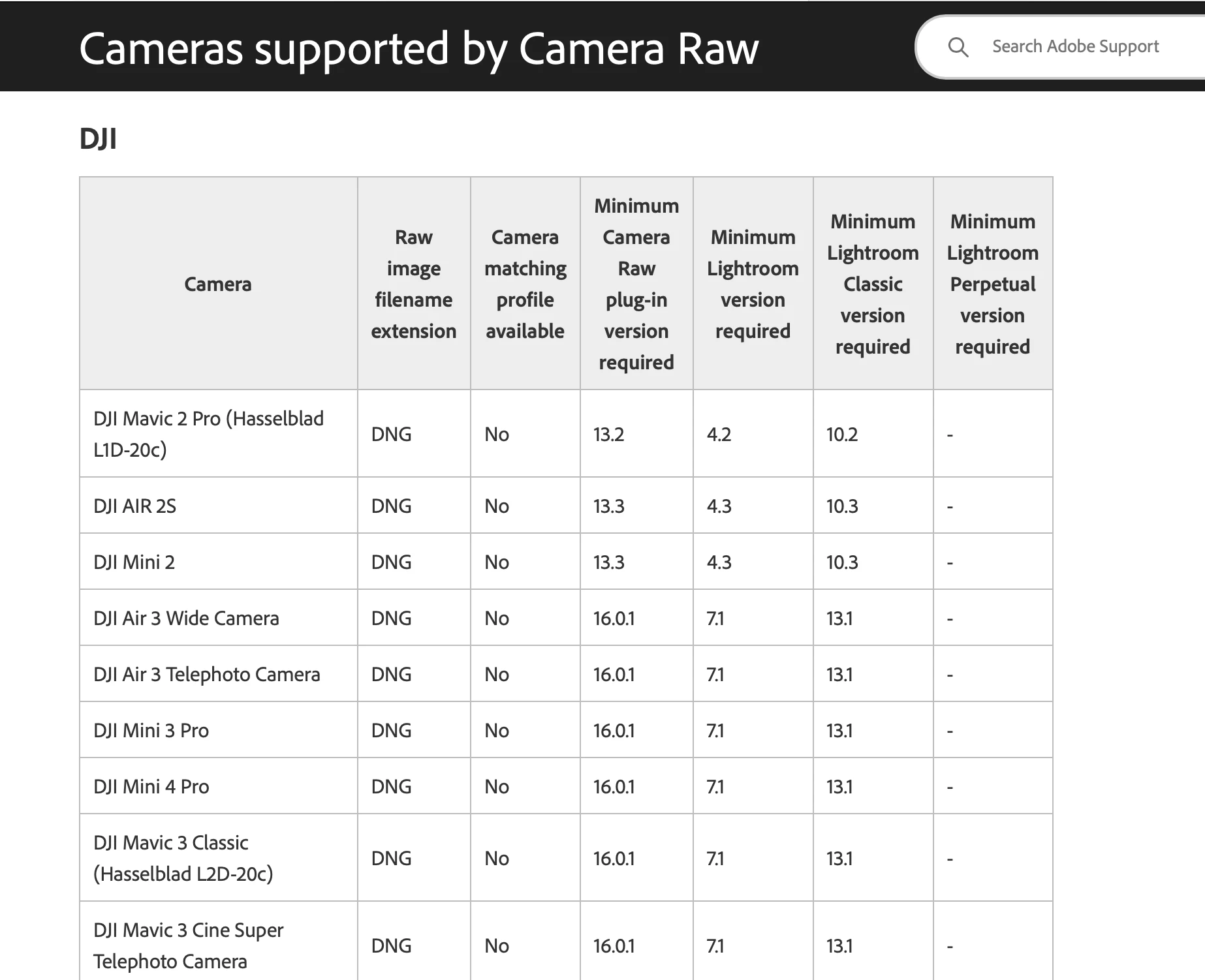
I have a DJI Mini 4 Pro drone. I believe, at least according to the Adobe website, that it is compatible with the latest version of the .DNG converter (17.1) for Mac. I've downloaded it, but it doesnt recognise any of my .DNG files. They are all greyed out. Am I missing something? I have an iMac 2019
3 replies

Jeff Arola
Community Expert
Community Expert
January 10, 2025

Nikonitis,


What version of macOS and Photoshop do you have?


Or are you using another photo editor?

NikonitisAuthor
Known Participant
January 12, 2025

Hi Jeff, I am using Affinity 2 with Mac OS Sequoia 15.1.1. I stopped using Photoshop a year or so ago as, having worked in Publishing for some years, I had CS6 for my work. I wasnt prepared to pay Adobe's very high fees for their digital version, so continued with CS6 until my Mac's OS would no longer tolerate it and started playing up. I had to update the OS to Sequoia, in which CS6 wouldnt work. IMO Affinty 2 is excellent and just as good as Photoshop.

My DJI Mini 4 Pro has the facility to create several different image files, when generating images. Generally, as I always did with my Nikon DSLRs, I set the camera to .NEF + jpeg, so I have a hi res editable file and a lightweight jpeg. The camera in the drone, has settings for jpegs, that sends it out processed. In Affinity 2, there are 2 types of .DNG converter, Serif Labs and Apple Core. Each one produces a different editable image. Serif Labs version is awful, with a halo exposure, blue cast, essentially uneditable. The Apple Core version creates a version that needs virtually no post work, providing it was correctly exposted in the first place! I wanted to see how Adobe's version works. It is my understanding that this Digital Neg raw file type was created by Adobe years ago to make it possible for different programs to opens files, from different camera manufacturers. That's where I am coming from.

Per Berntsen
Community Expert
Community Expert
January 14, 2025

You already have DNG files straight from the camera.

Although it is possible to run them through the DNG converter, there is little point in doing so.

I downloaded a sample DNG from the DJI Mini 4 Pro, converted it to DNG in the converter, and the two files are identical in every way. The only difference is the file size – the original is 24 MB, the converted file is 14 MB. The reduced file size is caused by the lossless compression that the DNG converter uses. Your drone might have a setting for using lossless compression, check it out.


The DNG format was introduced by Adobe in 2004.

It is an open format, and free for anyone (like camera manufacturers) to use. Not many camera manufacturers are using it, but quite a few photographers (including myself) convert their proprietary raw files (NEF, RAF and so on) to DNG.

https://en.wikipedia.org/wiki/Digital_Negative


... the latest version of the .DNG converter (17.1) for Mac. I've downloaded it, but it doesnt recognise any of my .DNG files. They are all greyed out.


Where are they greyed out? I've never seen files greyed out in the DNG converter.

The only error message I have seen is this one, which displays if the chosen folder doesn't contain any raw files.


Wolf Eilers
Inspiring
January 7, 2025

Why would the OP need to use the DNG Converter? The DJI files are already in DNG format. Instead, use the Camera Raw plug-in from Photoshop or Bridge and check that the 16.0.1 (or later) version is actually installed.

Jeff Arola
Community Expert
Community Expert
January 7, 2025

Just point to the source (1 Select the Images to convert) to the folder, not the actual files inside.

NikonitisAuthor
Known Participant
January 10, 2025

Ive tried that but it doesnt make any difference

Per Berntsen
Community Expert
Community Expert
January 10, 2025

As pointed out by @Wolf Eilers the files are already DNGs, so why do you want to convert them?

Or did you accidentally shoot jpgs? In that case you'd get an error message like the one below.