


Participant
April 5, 2022
Question

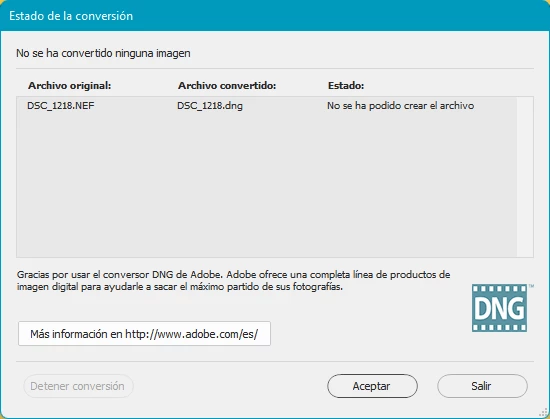
Error en la conversión a DNG

  • April 5, 2022
  • 2 replies
  • 1018 views

A ver si alguien me puede ayudar.
Llevo usando el Adobe DNG Converter varios años sin problema para convertir mis NEF a DNG y siempre ha funcionado bien. Tengo una Nikon D5300 y ahora mismo uso un PC con Windows 11.
En la última descarga de la camara, al pasar por la app de DNG Converter no convierte los archivos y sale el mensaje en cada línea de archivo: "No se ha podido crear el archivo".
This topic has been closed for replies.

2 replies

Jeff Arola
Community Expert
Community Expert
April 8, 2022

Did you use Nikon Transfer to get the D5300 Nefs from your camera to windows 11?

Participant
April 8, 2022

Si

Acabo de desinstalar el DNG Converter y volver a instalar la versión 9.1 y está funcionando. La Última versión es la que no funciona.
Muchas gracias por vuestra ayuda

Saludos

Ranjisha Sengupta
Legend
April 7, 2022

Hi there,


We apologize for the issue you are seeing while trying to convert NEF files using the DNG converter.


Would you mind sharing the version of the DNG converter you are currently using? Have you tried changing the SD card? Also, have you tried to change the location to which you are saving the converted files to check if that helps? Is it happening with all the files or a particular file? 

Try uninstalling and re-installing the software.

You can download the latest DNG converter using the link below.

https://helpx.adobe.com/in/photoshop/using/adobe-dng-converter.html#DownloadtheDNGConverter

Let us know if this helps.


Regards,

Ranjisha

Participant
April 7, 2022


Es la última versión, la descargué porque la anterior me daba el mismo problema.

Me ocurre con todos los archivos NEF, no me sucedía antes.
Los convierto desde una carpeta diferente del Disco Duro

Ranjisha Sengupta
Legend
April 7, 2022

Have you tried giving the permissions while launching the app? If not, right-click while launching and select the "Run as Administrator" option.

Also, try moving a few images to your internal drive and try to convert them.

Let us know how it goes.