


evak68206826
Participant
October 11, 2017
Answered

Experts say: calibrate your monitor!

  • October 11, 2017
  • 1 reply
  • 5295 views

Every time I calibrate my monitor interface in Ps and Lr  change color! Bridge is fine dark gray as always!  Ps in dark blue now . In Lr develop gives me true color , when I go to edit to Ps it has blue tint ! 😞 If I do not calibrate , no problem!?

This topic has been closed for replies.
Correct answer Per Berntsen

Hello again. I calibrated with new update and now Br Ps and Lr is purple .  Yesterday Br was perfectly gray, feel like crying!


I suspect that there is something wrong with the calibrator.

See if you can borrow a different calibrator, (it doesn't have to be a Spyder) and try calibrating with that.

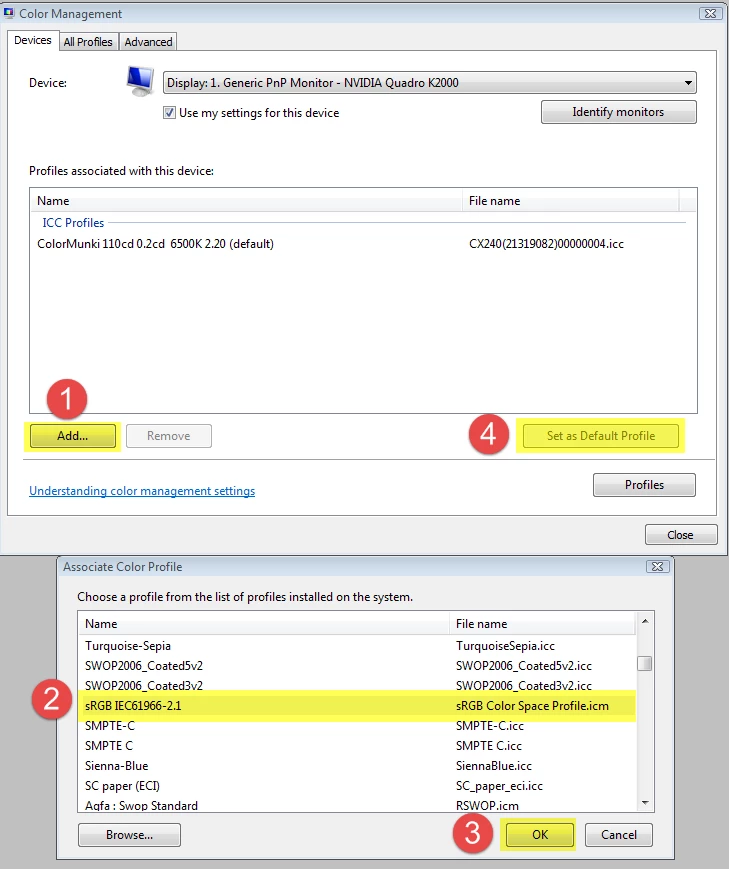
According to the specs for your monitor, it displays 100% sRGB, so for now I suggest that you set the monitor profile to sRGB, which shouldn't be too far off.

Go to Control Panel > Color Management, and set the sRGB profile as default.

1 reply

Per Berntsen
Community Expert
Community Expert
October 11, 2017

When Lightroom and Photoshop display differently, it's usually caused by a defective or incompatible monitor profile.

What is your operating system?

And how exactly do you calibrate?

If you use a hardware calibrator (which you should), make sure to create a matrix based, version 2 profile.

Table based and/or version 4 profiles can create problems.

evak68206826
Participant
October 11, 2017

Thank you so much for your reply.  I have window 7 and Asus PA238Q  "For photographers" LCD Monitor and Spyder4Express  . Without calibrating, colors are fine everywhere! I am trying to do right things and gives me trouble! 

Per Berntsen
Community Expert
Community Expert
October 11, 2017

I'm not familiar with the Spyder 4 Express, but it seems to have a limited number of options, and I don't think you can choose profile version and matrix/table based.

So it is possible that the calibrator is faulty, and is producing defective profiles, especially since this has happened several times.

Are you sure that you are running the latest version of the calibration software?

In Lr develop gives me true color

What do the colors look like in Library?