


Participating Frequently
November 2, 2017
Answered

Help Please.... Reset Camera Raw settings

  • November 2, 2017
  • 2 replies
  • 1254 views

I'm sorry if this is the wrong community to ask, but there didn't seem to be a specific Bridge community.

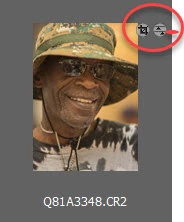
I am trying to access the unmodified version of a photo and I think it's done using one of the small ICONs on the Bridge viewing panel (shown in the circle below). Can someone please explain (or point me to documentation) what these symbols mean and how to use them? If these ICONs aren't the "secret" for accessing the original photo, any additional help would really be appreciated.

THANK YOU!
This topic has been closed for replies.
Correct answer Richard Southworth

The symbols indicate operations that have been performed on the raw image, they are not active mouse click targets.  You should be able to return the image to its original state by right-clicking on the image thumbnail in Bridge, choose Develop Settings, and then Clear Settings.

Richard Southworth

2 replies

JP Hess
Inspiring
November 2, 2017

This symbol on the left indicates that the image has been cropped. The symbol on the right indicates that adjustments have been made to the image. Since Camera Raw is usually set up with default settings, those settings will be applied whenever an image is opened. So that symbol will always be displayed initially. But if you clear the settings then it will disappear.

Richard SouthworthCorrect answer
Inspiring
November 2, 2017

The symbols indicate operations that have been performed on the raw image, they are not active mouse click targets.  You should be able to return the image to its original state by right-clicking on the image thumbnail in Bridge, choose Develop Settings, and then Clear Settings.

Richard Southworth

Participating Frequently
November 2, 2017

Perfect!  Thank you VERY much!