Inspiring
July 30, 2022
Answered

How reset the slider you pulled

  • July 30, 2022
  • 1 reply
  • 606 views

Loaded 50 images in ACR. I pulled wrong slider... Tempreature, had no inteniton of doing that. Amazing, after 100 years of this ACR, don't see a intuitive button to undo all things you just screwed up on.


I did see in three dots reset to default but don't think that did the trick image still to warm thanks!


Ah.. ok maybe wrong, temperature one and only slider where 0 in middel is not the default, so that is not the one to screw up on.. that said IS THERE A FASTER BUTTOM somewhere other than tedios three dots and mousing reset to default thanks!

This topic has been closed for replies.
Correct answer Rob_Cullen

@larry45  Getting back to your problem- "50 images in ACR. I pulled wrong slider... Temperature"

What are you experiencing when it "did not reset"?

Note: this procedure does not 'reset' to a previously changed temperature setting! (That would have needed an "UnDo" [Apple/Clover key + Z] at the time of the mistake)


To RESET the Temperature of 50 images in ACR- back to a 'default- As Shot' value-

1) Open the 50 images in ACR from Bridge.

2) Select them all   [Ctrl+A]

3) HOLD DOWN the [OPTION / ALT] key on the keyboard

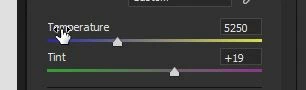
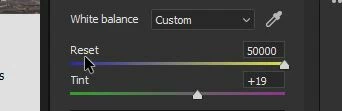
4) Point the mouse cursor exactly at the word "Temperature" and it changes to [Reset]

5) Click the mouse.  The Temperature slider will reset to the camera default

6) Lift the [Option / Alt] key and you can then adjust Temperature to your liking.


1 reply

Rob_Cullen
Community Expert
Community Expert
July 31, 2022

[Ctrl+Z] to undo the last command.

Or Hold [ALT] key and click on the Slider title "Temperature" which will change to "Reset". It Resets only the chosen slider.


Regards. My System: Windows-11, Lightroom-Classic 15.0, Photoshop 27.0, ACR 18.0, Lightroom 9.0, Lr-iOS 10.4.0, Bridge 16.0 .
larry45Author
Inspiring
August 2, 2022

Rob Mac, just tried, control ,  option, all keys clicked slider did not reset it.

Rob_Cullen
Community Expert
Rob_CullenCommunity ExpertCorrect answer
Community Expert
August 3, 2022

@larry45  Getting back to your problem- "50 images in ACR. I pulled wrong slider... Temperature"

What are you experiencing when it "did not reset"?

Note: this procedure does not 'reset' to a previously changed temperature setting! (That would have needed an "UnDo" [Apple/Clover key + Z] at the time of the mistake)


To RESET the Temperature of 50 images in ACR- back to a 'default- As Shot' value-

1) Open the 50 images in ACR from Bridge.

2) Select them all   [Ctrl+A]

3) HOLD DOWN the [OPTION / ALT] key on the keyboard

4) Point the mouse cursor exactly at the word "Temperature" and it changes to [Reset]

5) Click the mouse.  The Temperature slider will reset to the camera default

6) Lift the [Option / Alt] key and you can then adjust Temperature to your liking.


Regards. My System: Windows-11, Lightroom-Classic 15.0, Photoshop 27.0, ACR 18.0, Lightroom 9.0, Lr-iOS 10.4.0, Bridge 16.0 .