Participant
December 6, 2023
Answered

Impossibilité d'ouvrir une image par la commande fichier/ouvrir sous/camera raw

  • December 6, 2023
  • 1 reply
  • 221 views

Bonjour,

Il m'est impossible d'ouvrir un fichier (jpeg, PSD, NEF,...) dans Camera Raw avec la commande fichier / ouvrir sous. Il y a le message d'erreur "impossible d'analyser le fichier".

Version Photoshop : 24.3.0

Windows 10 à jour

Merci de votre aide.


This topic has been closed for replies.
Correct answer Rob_Cullen

Adobe Camera Raw  ACR  - is not an app that you can "Open".

You [Open] in Photoshop, and if the image file is proprietary raw (NEF, ARW, CR3,etc) it will be rendered in ACR (and edited) before it opens in Photoshop.

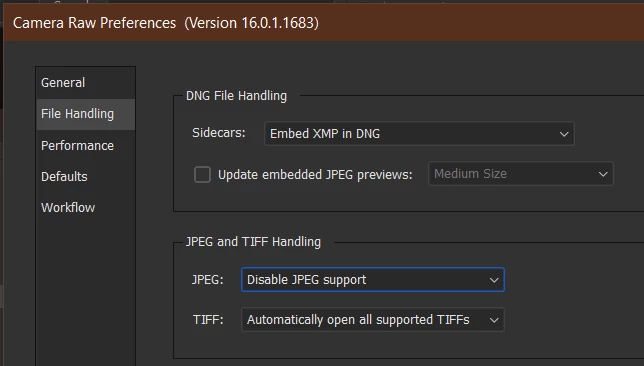
If you want 'Rendered RGB' files (JPG, PSD, TIF) to also "Open" through ACR then you change the Camera Raw File Handling preferences in Photoshop. (Or, use the similar UI Camera Raw Filter with the image open in Photoshop).


1 reply

Rob_Cullen
Community Expert
Rob_CullenCommunity ExpertCorrect answer
Community Expert
December 8, 2023

Adobe Camera Raw  ACR  - is not an app that you can "Open".

You [Open] in Photoshop, and if the image file is proprietary raw (NEF, ARW, CR3,etc) it will be rendered in ACR (and edited) before it opens in Photoshop.

If you want 'Rendered RGB' files (JPG, PSD, TIF) to also "Open" through ACR then you change the Camera Raw File Handling preferences in Photoshop. (Or, use the similar UI Camera Raw Filter with the image open in Photoshop).


Regards. My System: Windows-11, Lightroom-Classic 15.0, Photoshop 27.0, ACR 18.0, Lightroom 9.0, Lr-iOS 10.4.0, Bridge 16.0 .