janetm62681729
Known Participant
October 29, 2021
Answered

Interface changes to open multiple panels

  • October 29, 2021
  • 2 replies
  • 703 views

hi so i updated all my apps. Photoshop and Camera RAW


the editing section either has a bug or has been changed in a bad way


 i used to be able to have one screen open with Basic Adjustments and then ALSO with noise and sharpening sliders (detail). now i must toggle back and forth which is very time consuming. also when i go to the noise section the other tabs close and i have to re open everything again..

pls advise and thanks


This topic has been closed for replies.
Correct answer Rob_Cullen

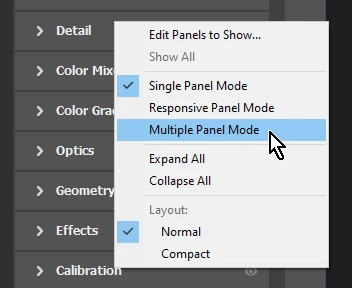
Do a [Right-CLick] on one of the Panel/Section Headers, and you can set the different "modes" for viewing panels-

In "Single Panel Mode"  (also known as "Solo Mode" in Lightroom-Classic) you normally only show the one panel you select. The others close down automatically. You can however hold down the [Ctrl/Cmd] key and click on another panel to show two (or more) panels in the "Single" mode. 


2 replies

Rob_Cullen
Community Expert
Rob_CullenCommunity ExpertCorrect answer
Community Expert
October 30, 2021

Do a [Right-CLick] on one of the Panel/Section Headers, and you can set the different "modes" for viewing panels-

In "Single Panel Mode"  (also known as "Solo Mode" in Lightroom-Classic) you normally only show the one panel you select. The others close down automatically. You can however hold down the [Ctrl/Cmd] key and click on another panel to show two (or more) panels in the "Single" mode. 


Regards. My System: Windows-11, Lightroom-Classic 15.0, Photoshop 27.0, ACR 18.0, Lightroom 9.0, Lr-iOS 10.4.0, Bridge 16.0 .
janetm62681729
Known Participant
October 29, 2021

for anyone with same issue there is a drop down menu and you need to select multiple panels.....be aware that when you upgrade even though you ask to preserve preferences not all of them carry over.

janetm62681729
Known Participant
October 30, 2021

yes thank you so much.. good to know!