


Answered
Is there a keyboard shortcut for "Erase from selected adjustment" ?
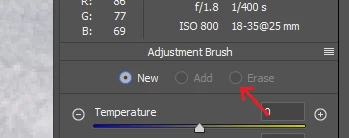 In the Adjustment Brush panel, if I hover over the "New" (Create a new adjustment (N) ) I can see that "N" will toggle the creation of a new adjustment brush. But I would really like if there would be a keybord shortcut for "Erase" (Erase from selected adjustment). I appologise if this is a newbie question, I am not an expert in Adobe Camera Raw, just switched from another RAW image processor. Maybe this informnation is somewhere available but I haven't found it so I created this post.
I would really apreciate if someone could answer. Thank you.

 AdChoices