Participant
May 5, 2018
Answered

Lens correction for Panasonic cameras

  • May 5, 2018
  • 2 replies
  • 13354 views

Hello Everyone,

While CameraRaw does support raw files from my Panasonic G85, I don't see Panasonic on the list of manufacturers under lens corrections.

Do I need to install profiles manually or do those not exist?

I did try searching for this topic but didn't find anything on it.

Thank you,

Gene Yuger

This topic has been closed for replies.
Correct answer ssprengel

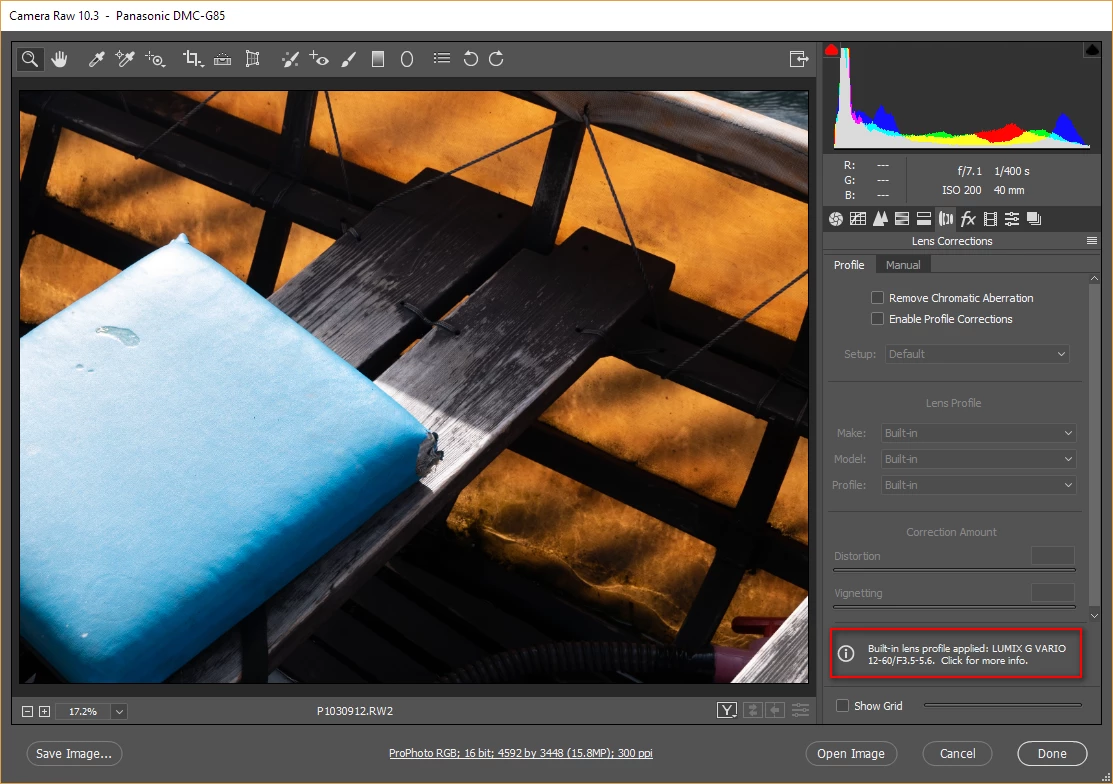
Lens profiles are stored in each raw file with mirrorless cameras like the G85 so there's no need to have an external profile file.

The latest versions of Adobe Camera Raw and Lightroom give you this information:

2 replies

Participant
August 3, 2020

I have an Olympus OMD EM1 Mkii camera with Lumix 8mm wide angle lens.  When I go to the Lens Correction tab as you've noted here it tells me that the profile has been applied automatically.....for chromatic aberration.  My real issue (above water) is that the lens is high distortion.  The lens correction appears to do nothing for this.  When I try to find my camera and lens combo in the Make/Model/Profile neither the camera nor the lens appear.  I found articles on how to create my own source file for this but it doesn't seem like that uncommon of a manufacturer that I should need to write code for it.  Does anyone have a suggestion for distortion fix for this specific camera and fisheye lens?


ssprengel
ssprengelCorrect answer
Inspiring
May 5, 2018

Lens profiles are stored in each raw file with mirrorless cameras like the G85 so there's no need to have an external profile file.

The latest versions of Adobe Camera Raw and Lightroom give you this information:

GinnoAuthor
Participant
May 5, 2018

I am such an idiot! Thank you so much. I didn't even look at the bottom of the dialog window!

Participant
March 28, 2022

I had the same problem and because of You now I know the answer. Thank you!!