


Lightroom and Camera Raw Object Selection Tool Not Working
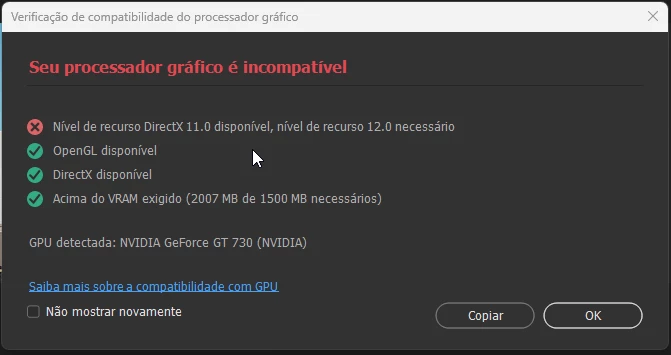
Lightroom and Camera Raw are not working with the AI-powered object selection tool. Please see the attached video to view the error occurring. While searching for the cause of the error, we found an alert when opening Photoshop, as shown in the attached image.
DirectX Error
English Translation:
**Translation:**
**Failure:** DirectX feature level 11.0 available, feature level 12.0 required
**Approved:** OpenGL available
**Approved:** DirectX available
**Approved:** Above required VRAM (2007 MB of 1500 MB needed)
**Detected GPU:** NVIDIA GeForce GT 730 (NVIDIA)
Original Text: Falha: Nível de recurso DirectX 11.0 disponível, nível de recurso 12.0 necessário Aprovado: OpenGL disponível Aprovado: DirectX disponível Aprovado: Acima do VRAM exigido (2007 MB de 1500 MB necessários) GPU detectada: NVIDIA GeForce GT 730 (NVIDIA)
Video
(*Mod note: changed Bridge to Camera Raw)
 AdChoices