Inspiring
August 9, 2026
Question

Lightroom Classic Distraction Removal on old curved glass

  • August 9, 2026
  • 2 replies
  • 21 views

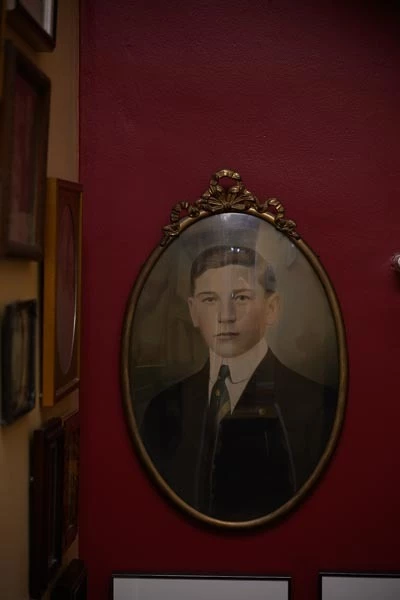
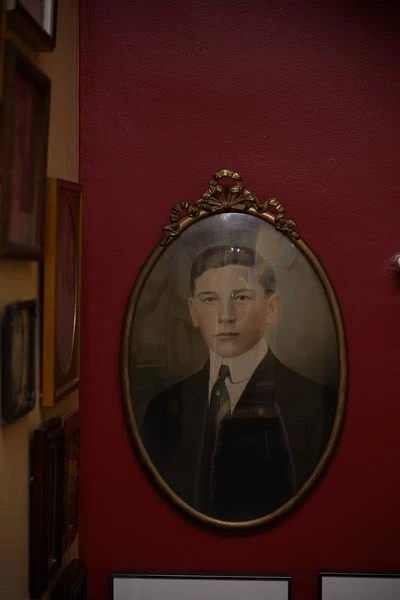
I have a 100 year old photo that was oil painted and framed in an oval with bowed glass. I tried very hard to light it without having a reflection of the light in the photo, but because the glass is bowed, I still had some reflections. The distraction remove tool, even at Best quality, doesn’t seem to do much. Honestly, I can’t see any significant different between before and after. 
Before distraction removal
After distraction removal at Best

Yes, I realize the image is dark, but I thought I would brighten it after removing the glare. Any ideas? Is this tool not going to work on bowed glass? 

    2 replies

    Conrad_C
    Community Expert
    Community Expert
    August 12, 2026

    From what I think I know about reflection removal as it’s currently trained, the reason it isn’t working with this image might not be about the bowed glass. The primary issue is that the reflection is only on the part of the image within the frame, which is a minority of the total picture area.

    The way they originally trained the machine learning model for this feature was to specifically address reflections taken through a window or other transparent panel such as a museum display case, so that the transparent panel and its reflections cover the entire field of view.

    That original model was not trained to handle reflections in just part of the image. That means it might only work for framed art if the glazing covered the entire picture, like a close-up detail view. But this example is a picture where most of the image (the frame, the wall, and the rest of the room) do not have the same reflection to remove, so the current model doesn’t succeed.

    Of course, cases like this are common, so people have asked for it. An even more common case is wanting to remove reflections from eyeglasses, so a lot of people ask about that. Adobe actually anticipated this because in the article “Removing window reflections in Adobe Camera Raw” that Adobe engineers published at the time they added reflection removal, they said:

    We're also looking into removing small reflections like eyeglasses and distant windows. 

    So they do want this feature to take care of small-area reflections like the one in your picture, but it looks like they haven’t gotten there yet.

    If they do make that happen, I don’t know if the bowed glass will be a further obstacle or not. I just think the bigger issue for now is that it isn’t a whole-picture reflection. It’s part of why Adobe often talks about this feature in terms of “window reflections,” by which they really mean reflections in a photo taken through a window.

    Inspiring
    August 12, 2026

    Thanks for the detailed explanation. Trying to take a picture of this piece of art is going to really  test my lighting skills.