


biriem
Participating Frequently
May 7, 2013
Question

Lossy DNG shows strong visible differences but JPG not, is this a bug?

  • May 7, 2013
  • 6 replies
  • 21832 views

Hello,

I tried out the lossy DNG format with a lot of pictures.

For most pictures I can't find any visible differences.

But I found also some pictures with very noticible visible differences between lossless and lossy DNG.

It seems that the lossy DNG format has problems with dark pictures with small light sources for example

the stars in the dark sky or the red lights of an aeroplane in the dark sky.

I have an example where you can see red security lights of a great antenna on top of a mountain.

Surprisingly with this extreme example the JPG versions looks much better as the lossy DNG version of my source lossless DNG.

Here is the cropped JPG from the lossless DNG (file size 10877KB):
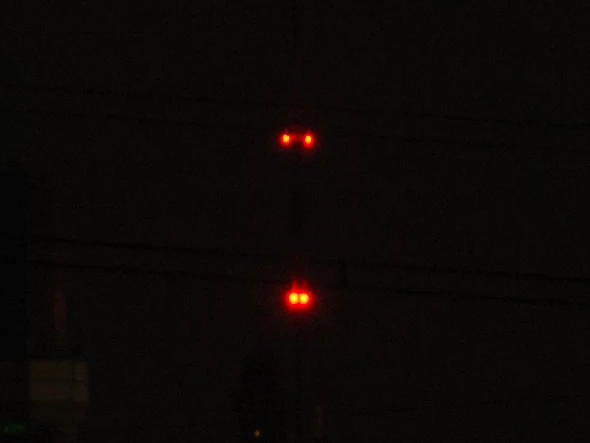
Between this JPG and the lossless DNG file is no visible difference.

And here a JPG from the lossy DNG (file size 13261KB):
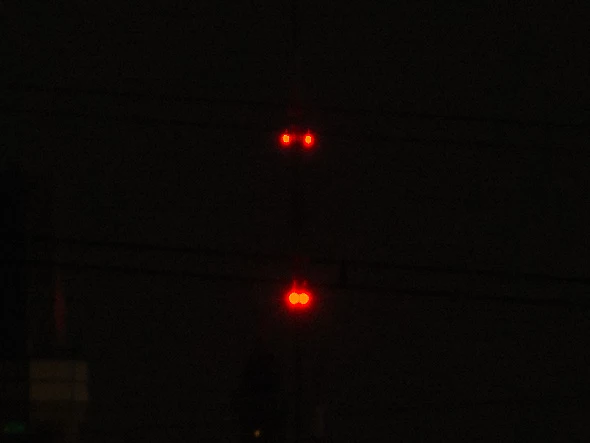
Between this JPG and the source lossy DNG file is no visible difference.

The source of both DNG files was a NEF File from a Nikon D7100.

Also interessting is, that for this excample the file size of the lossy DNG is  greater than the lossless DNG. This seems crasy IMHO.

I was very surprised, that JPG result is is much better than the lossy DNG for this case.

Perhaps there is a hidden bug in the lossy DNG conversion process.

I hope Adobe can look in to this. If you need the original NEF file let me know.

This topic has been closed for replies.

6 replies

Participant
July 17, 2019

Interesting post, I have been using DNG lossless files for over 10 years and using DNG lossy files a lot in the last year so here is my 2 cents.

I started using the lossy DNG format as lossless DNG files (from Fuji raw files) were just so big (30-35mb) it slowed down my workflow and was taking up too much space. At first i only made lossy DNG for my B-roll pics, but then after a while I went all in with lossy.

I have ran a number of tests between the lossy and and lossless DNG and can say that 90% of time time you cant tell the difference, even in high ISO lossy looks the same as lossless. The only photos i have noticed a issue with lossy is high contrast scenes with a wide scale of bright and dark (e.g. clouds in below pic), In these scenes i noticed a small increase in noise in the dark areas at 200% zoom, so nothing major really.

If you want something in the middle between huge raw and fragile jpeg, lossy is a pretty good middle ground.

Participating Frequently
February 1, 2018

It is truly discouraging that an issue like this remains ignored after years of waiting.

JP Hess
Inspiring
February 8, 2018

I don't know that it has been ignored. If you want to work with lossy DNG thing you have to be willing to work within its limitations. If you don't like the limitations then don't use the lossy option. It's pretty straightforward, in my opinion. After all, it is LOSSY.

Participating Frequently
February 9, 2018

The problem is the limitations aren't definable because there is inconsistency that hasn't been addressed. No one would argue that you compress to the level you're comfortable with, and everyone has the right to determine their own size/quality threshold, but anomalies like this make it impossible to embrace a compression that may in fact be a better fit for most photographers.

Duarte Bruno
Participant
May 20, 2016

IIRC, lossy DNG is 8bit. Adaptable 8bit but still 8bit.
Because it's adaptable, it can work great 99% of the times in highlight zones and in shadow zones, but probably not in zones where there are both highlights and shadows.
It's also quite possible that I've just read the Wikipedia page for DNG and I'm just talking out of my arse.

Cheers!

Known Participant
June 12, 2018

Duarte Bruno has it right. When converting to lossy DNG the image gets squeezed to fit within 8 bits. In most cases this is unproblematic. The image in this example has very deep blacks and bright highlights, and the conversion process does not handle it well.

It might be that this can be tweaked in the converter—or maybe this would require a new format (i.e. lossy DNG v2).

I am extremely satisfied with the lossy DNG format (and DNG in general), and hope Adobe will continue improving on it.

Participant
June 19, 2013

Let me share my simple workflow in order to get the best of both worlds. First I import the raw files as lossless DNG. Then I develop them as usual and export them to high quality jpg so that I can print, share, save, etc. After a couple of months have passed, and I am pretty sure I will not have to modify the lossless DNG files again, I convert them to lossy DNG using lightroom. Chances are I will never require using those DNG files again, but just in case, I am keeping a raw copy of them that will also take much less disk space than the original raw files. My jpg files are obtained from the original lossless DNG files, so I assure I don't have any quality degradation there due to the lossy DNG format. The great thing is that lightroom keeps the original develop settings from the lossless DNG files, so in lightroom I can still see my developed files but now they are taking much less disk space.

Hope this can help someone.

biriem
biriemAuthor
Participating Frequently
May 17, 2013

I seems this thread becomes an one man show.

I don't know what is wrong with my article.

Perhaps this issue is not of any interest for the other members and also for Adobe.

I hoped that I can use lossy DNG, because I found for most of my pictures no visible differences between lossy or lossless DNG.

The results with lossy DNG were excellent except the problem I decribed here.

Unfortuately this is a showstopper for me and I will stop using lossy DNG, because I can't rely on it.

I must be sure, that for all kind of pictures the visible differences are not noticable within practicable range.

Unfortunately this is currently not the case.

very very sad

JP Hess
Inspiring
May 17, 2013

I thought about responding the other day, but decided my remarks wouldn't help you. And they still won't because I'm going to give you my personal opinion about lossy DNG. I don't think it is intended for your master "important" images. I watched a video on Adobe.tv about this, and the example that was given was, suppose you have taken pictures at a wedding. Perhaps you have 2000-3000 images, 500 of which are keepers that are really good. You don't want to get rid of the other bunch but want to save space. So those would be the images that you would convert to lossy DNG. I mean, let's be realistic about this. You can't throw away data and hope to still have full raw quality. That isn't the idea behind the format.

Personally, I think converting to DNG of any sort as a workflow routine is frivolous and unwise. I know a lot of people routinely download and convert, and then they don't have copies of their original raw images. Yes, I know, the DNG files contain all the original raw image data. But not all software will read those DNG files. For example, I use Nikon cameras. The cameras shipped with ViewNX 2. It's not a very useful program, but has a couple of features that I like to use once in a while. But it won't open the DNG files. And if I have converted and then discarded the original NEF files, I can't use the software. With my cameras there is only a 15-20% savings in space. The tutorial I watched indicated that the lossy DNG files would load in Lightroom up to 8 times faster. I haven't used a stopwatch, but if anything the DNG files take longer to load than the original NEF files.

The only benefit I see to converting to DNG is if I have a file from a camera for which I don't have native support because my software is older or not up-to-date. I know this hasn't helped you. But maybe it will stimulate some conversation and you'll get a more enlightening opinion from someone else.

areohbee
Legend
May 17, 2013

JimHess wrote:

The tutorial I watched indicated that the lossy DNG files would load in Lightroom up to 8 times faster. I haven't used a stopwatch, but if anything the DNG files take longer to load than the original NEF files.

Performance improvement (for images which are raw, or lossy-DNG being handled like raw) depends more on resolution reduction than compression scheme / file format.

biriem
biriemAuthor
Participating Frequently
May 14, 2013

Today I tried out Lightroom 5 beta.

I wanted to know, whether the above behaviour of the DNG lossy conversion is still there.

Unfortunately it is.

areohbee
Legend
May 27, 2013

biriem wrote:

Today I tried out Lightroom 5 beta.

I wanted to know, whether the above behaviour of the DNG lossy conversion is still there.

Unfortunately it is.

I thought you were referring to smart previews. Smart previews are just vanilla-flavored lossyDNGs so whatever happens with them would happen to those like them, and vice versa (theoretically).

Anyway, I did confirm some differences in exported lossy DNGs (by evaluating exported smart previews). Inside Lightroom's develop module they look almost exactly like the original raw, but when exported, things get a little wonked for some reason.

I haven't tried exporting the smart preview of your pic yet but I will.

Do standby...

Rob