Inspiring
June 27, 2023
Answered

Making a custom profile in ACR is not possible > error

  • June 27, 2023
  • 5 replies
  • 1424 views

Because I use the LUT "Crisp warm Look"  very often, I want to make a custom profile for using in Lr. That would make my workflow quicker, because I don't have to open the images in Ps, only to get that LUT.

Glyn Dewis made an how to on YT: https://www.youtube.com/watch?v=wTawgLU7lCk&t=167s.
You create this in ACR. I've tried it with startingpoint Ps-ACR and also with Bridge-ACR.

At first I struggled with the step to make a new profile (via Ps + ACR): tick the 3 dots (=More image settings), press ALT + Create Preset and there is the drop down menu where you can make a new profile.  I press and hold ALT, but when I press Create Preset the drop down menu disappears immediately.
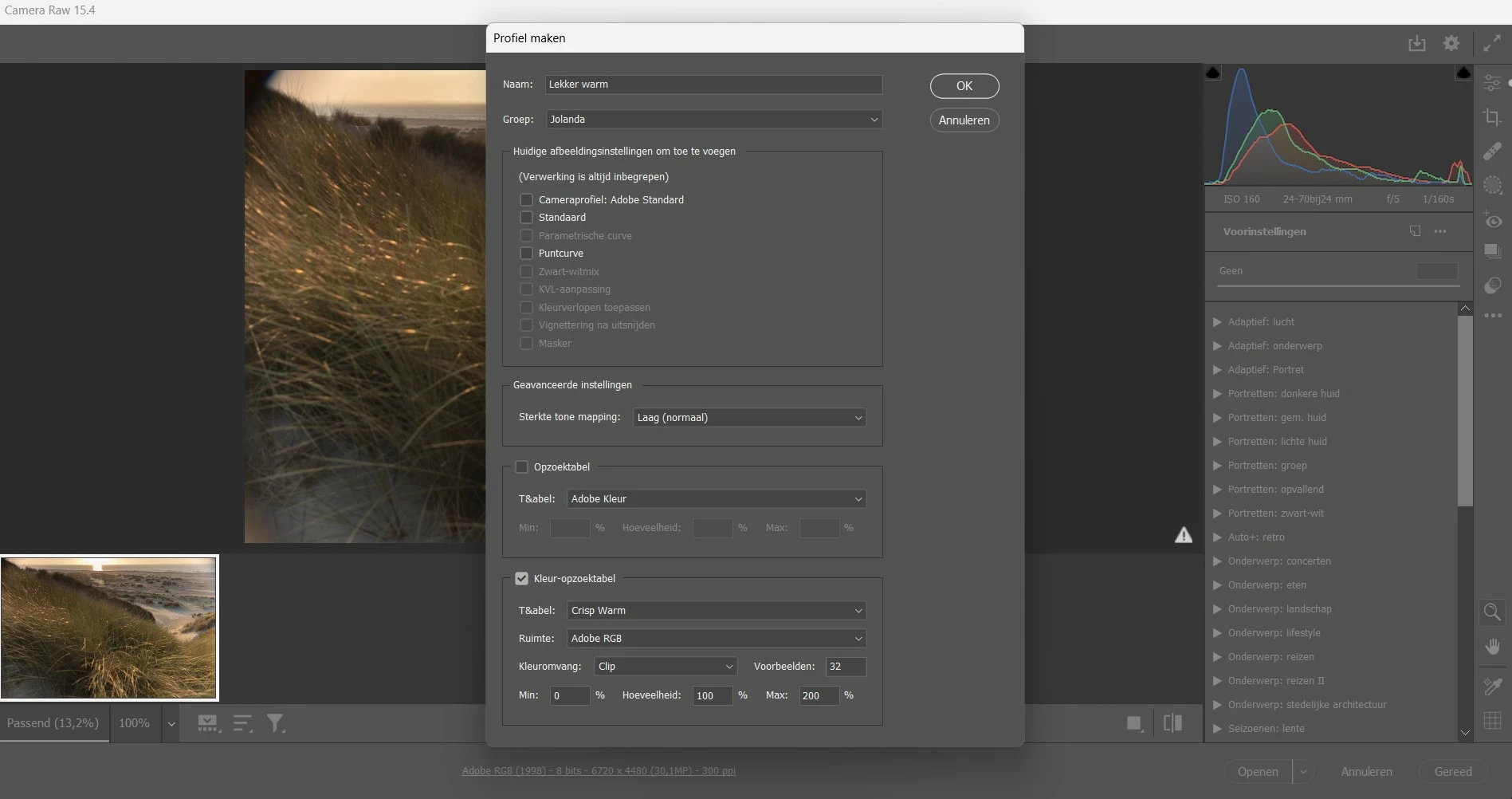
But I found alternative way to do this, via Bridge + ACR: go to Presets, click on Create preset, press and hold ALT and Create Preset and there appears the drop down menu to create a new profile. So far so good.

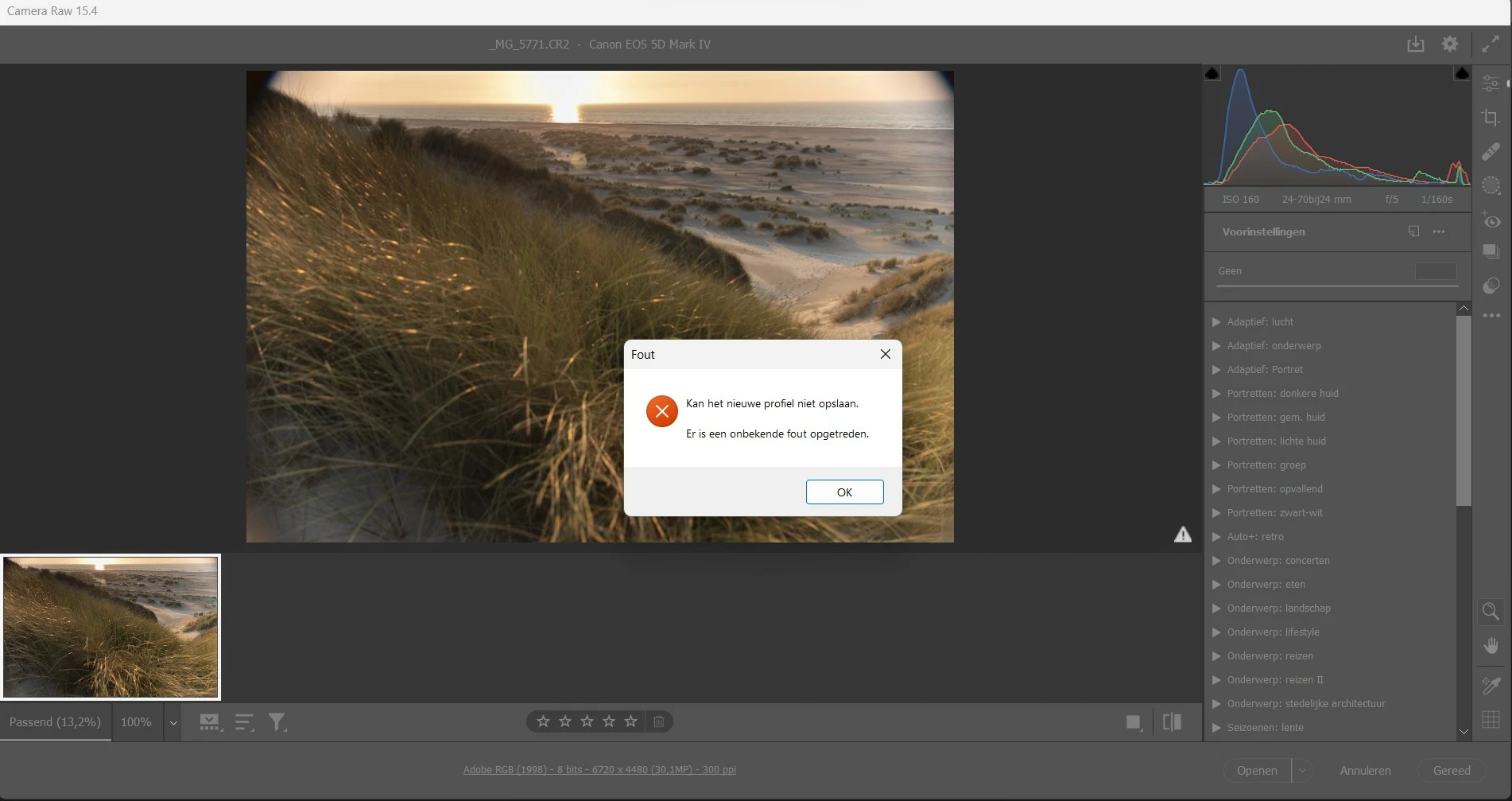
Then I filled in the drop down menu, see foto 1. I filled it just like the instructor Glyn Dewis did in his YT tutorial. When I pressed enter, I get an error, see foto 2.


What am I doing wrong? Does someone recognises this? I've searched in this forum and om www, but can't find an answer to this issue. Hope someone can help me.


P.s: the Table I want to use is a CUBE file.


This topic has been closed for replies.
Correct answer Jeff Arola

Perhaps resetting the Camera Raw preferences will solve the issue:


Hold down the Command key and select Photoshop > Preferences > Camera Raw (macOS) or hold down the Ctrl key and select Edit > Preferences > Camera Raw (Windows).

Click Yes in the dialog that asks "Delete the Camera Raw Preferences?"

5 replies

Participant
April 25, 2024

Ok, this was driving me crazy, because it was doing it to me as well, but there is a solution we found that is INSANE that it comes down to this, but it works.


1. Open your .cube file (usually text editor on mac)

2. At the VERY LAST LINE, add in a space


And that's it—it should now work.


Jeff Arola
Community Expert
Jeff ArolaCommunity ExpertCorrect answer
Community Expert
June 29, 2023

Perhaps resetting the Camera Raw preferences will solve the issue:


Hold down the Command key and select Photoshop > Preferences > Camera Raw (macOS) or hold down the Ctrl key and select Edit > Preferences > Camera Raw (Windows).

Click Yes in the dialog that asks "Delete the Camera Raw Preferences?"

JolandaMCAuthor
Inspiring
July 11, 2023

Thank you Jeff! That seems to be the resolution to this issue.

f64academy.com
Participant
June 29, 2023

I think this is a new issue with the latest ACR update.  I have a similar problem with a LUT profile I was trying to create as well.  Unfortunately, we can't backdate ACR (that I know of) so we will have to wait for Adobe to come up with a fix I think.

JolandaMCAuthor
Inspiring
July 1, 2023

Maybe. But I've this issue since a year ago (when I saw the Tut from Glyn Dewis) and dispite the updates since then it still excists.


mglush
Community Expert
Community Expert
June 28, 2023

Hi,

Here is an article that might be helpful in making a custom profile:

https://blog.adobe.com/en/publish/2018/04/24/profiles-profiles-work-make

Michelle

Jeff Arola
Community Expert
Community Expert
June 27, 2023

From where did you get the LUT "Crisp warm Look"?


The error message says

Cannot save the new profile

An unknown error has occurred.

JolandaMCAuthor
Inspiring
July 1, 2023

From a custom made file, sored on my pc.