

Participant
July 23, 2023
Question

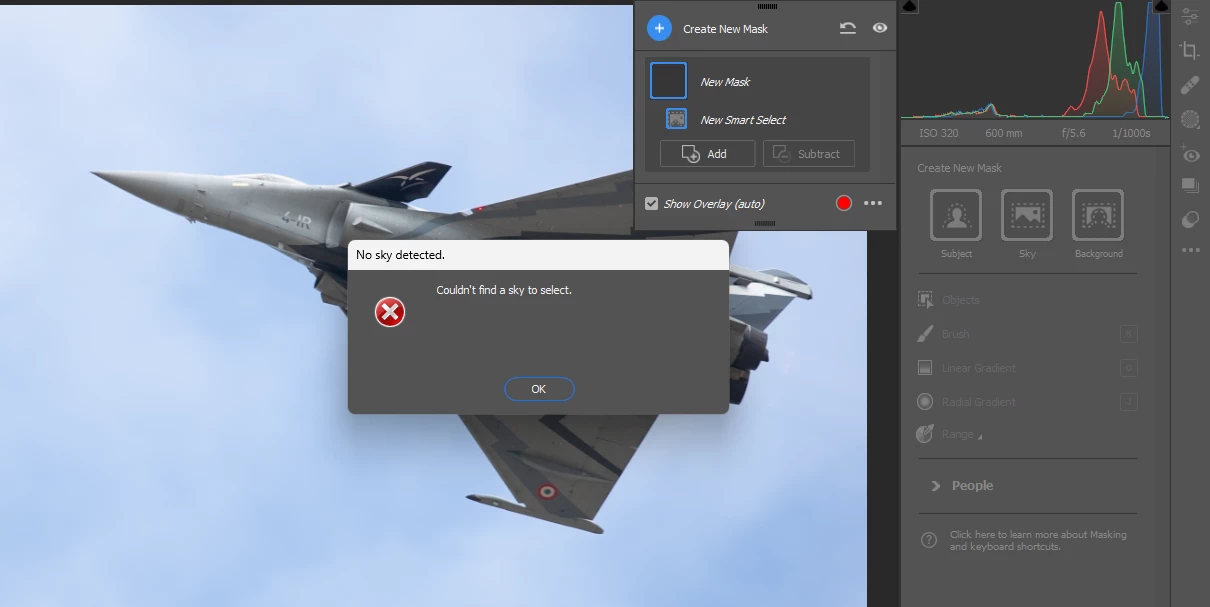
mask problems in photoshop in raw
  • July 23, 2023
  • 2 replies
  • 205 views

Help please, how do i resolve this issue when trying to create a new mask when clicking on the sky button ?

This topic has been closed for replies.

2 replies

Per Berntsen
Community Expert
Community Expert
July 25, 2023

My guess is that you get this error message because there is no horizon in the image.

Try clicking on Background instead.

If that doesn't work, try selecting Subject, then click on the three dots next to Mask 1, and choose Duplicate and invert mask.


Sameer K
Community Manager
Community Manager
July 25, 2023

Hey, @paul290749266j28. Welcome to the Camera Raw community. I'll need more info to help you figure this out. Please share the system info of Photoshop from Help > System info > Copy & paste into a text document > upload to Creative Cloud files (https://assets.adobe.com/files) and share it with us.


What troubleshooting steps have you tried? As a primary step, reset Camera Raw & Photoshop.

For Camera Raw,

  • Hold down the Ctrl + ALT key and select Edit > Preferences > Camera Raw (Windows).
  • Click Yes in the dialog that asks, 'Delete the Camera Raw Preferences?'


If this does not help, go to the location of the preference folder below and rename it to backup. https://helpx.adobe.com/photoshop/using/preferences.html

  • Windows 10/11: Users/[user name]/AppData/Roaming/Adobe/Adobe Photoshop [version]/Adobe Photoshop [version] Settings
  • Press Windows + R & type this is the Run Window - %APPDATA%\Adobe


  • Rename the Adobe Photoshop folder by adding a .old at the end. (Adobe Photoshop 2023 > Rename > Adobe Photoshop 2023. old)


These changes will give a fresh start to Photoshop & Camera Raw as a fresh install. Let me know how it goes.

Thanks!

Sameer K