Participant
October 3, 2020
Answered

MIKH5555

  • October 3, 2020
  • 2 replies
  • 861 views

Where is the flyout menu in Camera Raw 12.4?

This topic has been closed for replies.
Correct answer TheDigitalDog

He may be using an older version of Camera
Raw in this book. I can't find the settings he is discussing.


Indeed, he's way off in terms of the latest version(s) of ACR. 

There is also no "automatic capture sharpening" but there are defaults you may or may not wish to use or update.

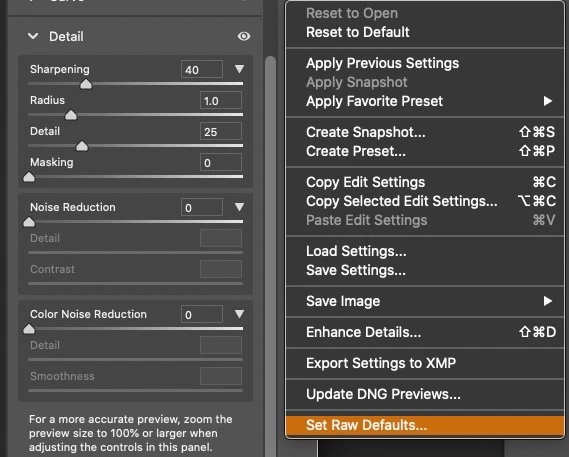
You can reset 'raw defaults" seen below, but you need to understand the new ways in which defaults are constructed, and  Kelby's old book is now moot in that respet. This video is a great start:


https://laurashoe.com/2020/02/11/whats-new-in-lightroom-classic-9-2-raw-defaults/

Video: https://youtu.be/XGCnR9qEqA4
2 replies

ssprengel
Inspiring
October 4, 2020

The gear at the top and three-dots along the side as well as three-dots in the browser-profiles area, all lead to other menus:

Otherwise you might need to give us a hint about what options or operations you're expecting whatever flyout menu to lead to.

Participant
October 4, 2020
OK, thanks.
JP Hess
Inspiring
October 3, 2020

What flyout menu are you referring to. That is something I'm not familiar with.

Participant
October 4, 2020
I'm reading *The Adobe Photoshop CC Book for Digital Photographers * by
Scott Kelby, 2017 release. He says, regarding Sharpening, if you want to
turn off automatic capture sharpening, set the sharpening slider to zero
then go to the Camera Raw flyout menu and choose Save New Camera Raw
Defaults.

I can't find the flyout menu. He may be using an older version of Camera
Raw in this book. I can't find the settings he is discussing.

Thanks.
TheDigitalDog
TheDigitalDogCorrect answer
Inspiring
October 4, 2020

He may be using an older version of Camera
Raw in this book. I can't find the settings he is discussing.


Indeed, he's way off in terms of the latest version(s) of ACR. 

There is also no "automatic capture sharpening" but there are defaults you may or may not wish to use or update.

You can reset 'raw defaults" seen below, but you need to understand the new ways in which defaults are constructed, and  Kelby's old book is now moot in that respet. This video is a great start:


https://laurashoe.com/2020/02/11/whats-new-in-lightroom-classic-9-2-raw-defaults/

Video: https://youtu.be/XGCnR9qEqA4

Author “Color Management for Photographers" & "Photoshop CC Color Management/pluralsight"


