

charlesm59758123
Participant
December 28, 2021
Answered

Missing Masking Options in ACR

  • December 28, 2021
  • 1 reply
  • 1319 views

I no longer have the full masking options showing up in ACR. How do I get them back? Now the only options showing up are brush, linear gradiant, and radial gradiant.

Thanks!
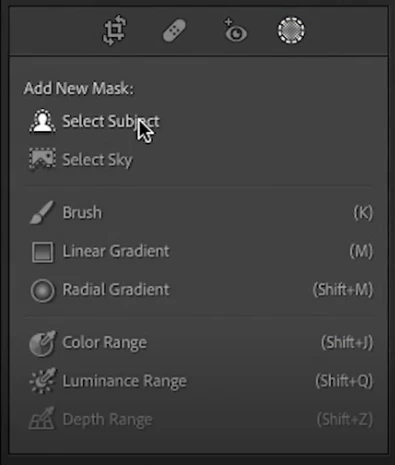


This topic has been closed for replies.
Correct answer TheDigitalDog

Look at the Calibration panel. You old photos are not set to Process Version 5.

1 reply

Rikk Flohr_Photography
Community Manager
Community Manager
December 28, 2021

Make sure the Process Version of the image is PV5

Rikk Flohr: Adobe Photography Org
charlesm59758123
Participant
December 28, 2021

Thank you for your speedy reply. Yes, I opened a recent photo and the options were all there. Excuse my ignorance, but what is PV5? I'm "assuming" a raw photo I took 10 years will need be able to use these new functions?

thanks again.


Rikk Flohr_Photography
Community Manager
Community Manager
December 28, 2021

Go to Calibration Panel at the bottom of the Edit stack and set the PV Process Version of the image to 5.  

Rikk Flohr: Adobe Photography Org
