Participant
February 8, 2024
Answered

My Camera Raw isn't working anymore

  • February 8, 2024
  • 2 replies
  • 330 views

Hi Guys

My Camera Raw isn't working anymore if I open it via Photoshop or Bridge it causes the Programm to not respont anymore and the only way to close it is via Task manager.


Reinstalling Photoshop hasnt worked either, thanks for your help.


System Specs:

W10 Enterprise Edition

10.0.19045 Build 19045

HP ZBook Studio 16 G10

Intel 19-13900H

4070 Laptop Edition

This topic has been closed for replies.
Correct answer Per Berntsen

Try resetting the Camera Raw preferences.

In Photoshop, go to Edit > Preferences > Camera Raw. Click Camera Raw with the Control key pressed.

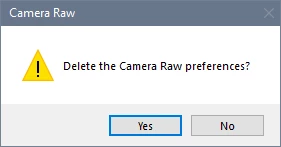
Click Yes in the dialog that follows.


2 replies

Per Berntsen
Community Expert
Per BerntsenCommunity ExpertCorrect answer
Community Expert
February 8, 2024

Try resetting the Camera Raw preferences.

In Photoshop, go to Edit > Preferences > Camera Raw. Click Camera Raw with the Control key pressed.

Click Yes in the dialog that follows.


Participant
February 8, 2024

wow it worked, thanks 😀

jane-e
Community Expert
Community Expert
February 8, 2024

@Rafael23747883mr4i 


I've moved your post from Using the Community (for questions about the forums) to the Adobe Camera Raw forum for you.


Jane

Participant
February 8, 2024

Thanks