Inspiring
December 28, 2018
Answered

NEW ACR questions, nice upgrade- observations too.

  • December 28, 2018
  • 2 replies
  • 1673 views

Just on on board PS CC 2019. Nicest ACR ever seen. I'm not a big aficionado but this was hard to ignore:

- For first time, seems I don't have to always click Done, to make sure adjustments are safe. I'm seeing the change icons in the thumb previews on the left in real times. Is this new? Maybe just have not noticed before.  It's auto saving finally?

- Faster, am I correct?

- It seems to be creating duplicate, after cropping - backups in real time,  is this new? Does these stay around?

- It is crashing a lot, and then says (are you sure you want to open 57 files?). Did it three times. So then from Bridge I had to redo my open in ACR again. But because everything is faster it's quick to deal with.

- I'm puzzled with straighten tool. It says double click. I do that but nothings straightens.

- Bridge is also finally fast. I posted about that, no response. Bridge has always been slow.

    This topic has been closed for replies.
    Correct answer ssprengel

    - For first time, seems I don't have to always click Done, to make sure adjustments are safe. I'm seeing the change icons in the thumb previews on the left in real times. Is this new? Maybe just have not noticed before.  It's auto saving finally?

    The thumbnails in ACR and Bridge show the changes as you make them.  This is not new.

    - Faster, am I correct?

    ACR can use the GPU so it might be faster.

    - It seems to be creating duplicate, after cropping - backups in real time,  is this new? Does these stay around?

    Not sure what "duplicate, after cropping" means.  I just see an updated preview in ACR and Bridge.  You might describe the process you are following in more detail and say what you see vs what you expect.

    - It is crashing a lot, and then says (are you sure you want to open 57 files?). Did it three times. So then from Bridge I had to redo my open in ACR again. But because everything is faster it's quick to deal with.

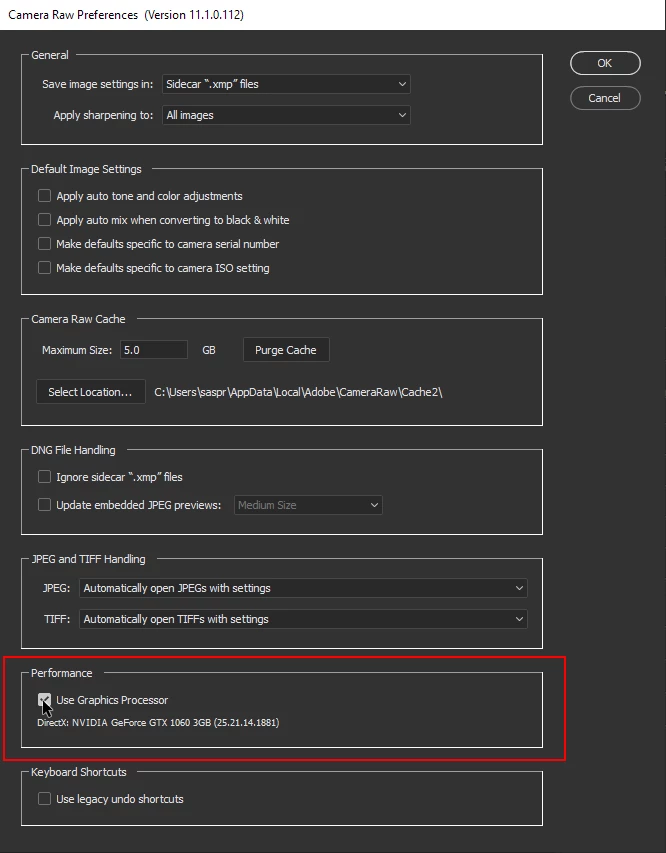
    For problems with crashing, it's usually the graphics card or driver having issues.  First try updating to the latest driver for your video card.  If that doesn't help, try disabling the GPU.  You can do this by going into Preferences in camera raw and unchecking the Use Graphics Processor item.  If you have a 3K to 5K monitor you might need the GPU to speed things up sufficiently, so try this experimentally and just turn it back on if you can live with the crashing.  If these screenshot previews are too small, click on each in the message and it'll show full resolution.  My monitor is only 1680x1050 so if yours is higher resolution you might have to resize or zoom in on the image in whatever browser or image-viewer you are using to see them.
    - I'm puzzled with straighten tool. It says double click. I do that but nothings straightens.

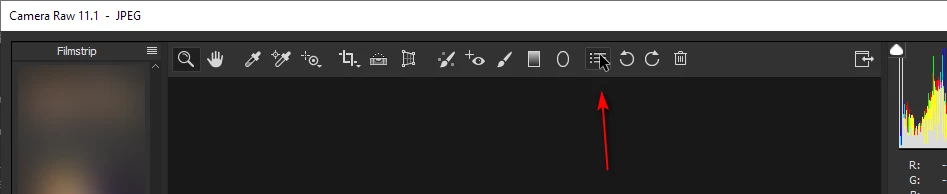
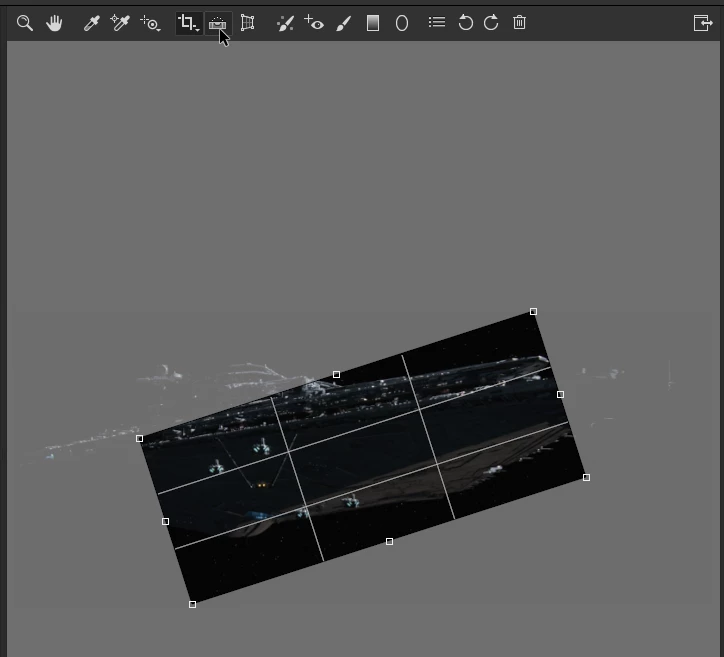
    Double-clicking the Straighten Tool (bubble level icon) does work, but only on images where it can detect a horizon and some images don't have anything it recognizes as a horizon.  Here I've double-clicked the "level" tool on an image of a star destroyer and it found something to align on, just not something that makes sense, but it demonstrates the tool can do something:
    - Bridge is also finally fast. I posted about that, no response. Bridge has always been slow.

    Bridge uses ACR to do it's previews and can use the GPU so may be faster on that account.  Depending on what version of PS you had previously, it might not have used the GPU.

    2 replies

    ssprengel
    ssprengelCorrect answer
    Inspiring
    February 6, 2019

    - For first time, seems I don't have to always click Done, to make sure adjustments are safe. I'm seeing the change icons in the thumb previews on the left in real times. Is this new? Maybe just have not noticed before.  It's auto saving finally?

    The thumbnails in ACR and Bridge show the changes as you make them.  This is not new.

    - Faster, am I correct?

    ACR can use the GPU so it might be faster.

    - It seems to be creating duplicate, after cropping - backups in real time,  is this new? Does these stay around?

    Not sure what "duplicate, after cropping" means.  I just see an updated preview in ACR and Bridge.  You might describe the process you are following in more detail and say what you see vs what you expect.

    - It is crashing a lot, and then says (are you sure you want to open 57 files?). Did it three times. So then from Bridge I had to redo my open in ACR again. But because everything is faster it's quick to deal with.

    For problems with crashing, it's usually the graphics card or driver having issues.  First try updating to the latest driver for your video card.  If that doesn't help, try disabling the GPU.  You can do this by going into Preferences in camera raw and unchecking the Use Graphics Processor item.  If you have a 3K to 5K monitor you might need the GPU to speed things up sufficiently, so try this experimentally and just turn it back on if you can live with the crashing.  If these screenshot previews are too small, click on each in the message and it'll show full resolution.  My monitor is only 1680x1050 so if yours is higher resolution you might have to resize or zoom in on the image in whatever browser or image-viewer you are using to see them.

    - I'm puzzled with straighten tool. It says double click. I do that but nothings straightens.

    Double-clicking the Straighten Tool (bubble level icon) does work, but only on images where it can detect a horizon and some images don't have anything it recognizes as a horizon.  Here I've double-clicked the "level" tool on an image of a star destroyer and it found something to align on, just not something that makes sense, but it demonstrates the tool can do something:

    - Bridge is also finally fast. I posted about that, no response. Bridge has always been slow.

    Bridge uses ACR to do it's previews and can use the GPU so may be faster on that account.  Depending on what version of PS you had previously, it might not have used the GPU.

    larry45Author
    Inspiring
    February 7, 2019

    thanks a lot to understand, and post is old now but appreciate it.

    I have mac 27" about 3 years old

    "First try updating to the latest driver for your video card"... should I bother with that?

    Just checked for first time: use graphic processor is unchecked, should it be checked?  This is over my head. thanks.

    Akash Sharma
    Legend
    December 28, 2018

    Hi Larry4545,

    Thanks for sharing your feedback. We thrive for user feedback and it really helps us improve our products.

    We'd love to get this request and feedback submitted officially as a feature request so the engineering team can get this recorded. Could you please post this feedback here: Camera Raw and DNG | Photoshop Family Customer Community

    Our Engineers do monitor this space and look for major feature requests from our valuable users like you to shape the product further.

    Regards,

    Akash

    larry45Author
    Inspiring
    December 29, 2018

    Thanks Akash your link -- I'm  puzzled, it just went to a similar forum called camera / raw dng. Did not see work feedback there.

    Also: I do have 5 questions or so here about straightening, and more, can you please help answer?

    larry45Author
    Inspiring
    February 5, 2019

    Again, no one has answered a single question.
