Participant
December 11, 2021
Answered

No Brush tool in Camera Raw

  • December 11, 2021
  • 4 replies
  • 2924 views

Hi, I'm trying to locate the brush tool in my camera raw, but is just not there. What could be the problem?

This topic has been closed for replies.
Correct answer Ged_Traynor

Hi

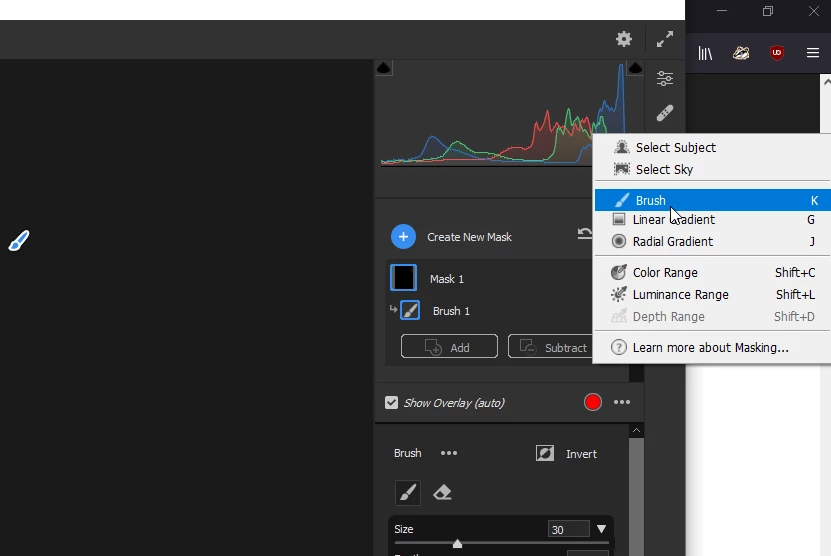
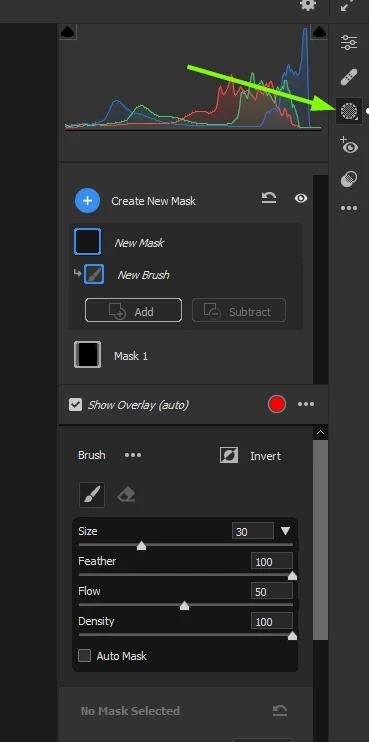
Press K on the keyboard or click and hold on the masking icon to reveal the options

4 replies

Inspiring
February 7, 2023

Is it possible to use adjustment brushes in camera raw v15? There are a number of free and paid brushes for Lightroom that one can download, but there seems to be no facility to use adjustment brushes within camera raw v15. I've seen videos on how to instal lightroom presets into acr, but that's about it. (spent a lot of time Googling possible solutions but to no avail). Thanks in advance for any help.

Inspiring
February 7, 2023

Just to clarify my previous query: Is it possible to use different brushes within ACR, not just an adjustment brush within the masking area. Similar to kelvin Pimont's Lightroom brushes.

Rikk Flohr_Photography
Community Manager
Community Manager
February 7, 2023

In what format does "Kelvin Pimont" deliver their presets?  I looked at their video and they are calling them brushes but the are just a Local Adjustment Preset and not limited to Brush Strokes only.  Camera Raw can make use of presets for Local Adjustments. See below for the location:

Rikk Flohr: Adobe Photography Org
Chuck Uebele
Community Expert
Community Expert
December 12, 2021

Another shortcut is "M" which brings up the masking panel, and then you can select a variety of masks, including the brush tool.


Moved to the Camera Raw forum, from the Photoshop forum.

barbara_a7746676
Community Expert
Community Expert
December 12, 2021

I struggled with that at first too. Adobe changed the icon. The brush is still there but the icon doesn't look like a brush anymore. Someone's practical joke?

Ged_Traynor
Community Expert
Ged_TraynorCommunity ExpertCorrect answer
Community Expert
December 11, 2021

Hi

Press K on the keyboard or click and hold on the masking icon to reveal the options
Participant
December 11, 2021

Thank you.