Participant
February 17, 2018
Answered

Olympus lens profiles in Lightroom?

  • February 17, 2018
  • 2 replies
  • 27476 views

Does anybody knows why there are no lens profiles for Olympus lenses in Lightroom? Olypmus camera profiles are all available, but no lens which does not seem to make much sense. Isn't there enough "pull" from photographers? I guess quite a lot of people use Olympus lenses togetehr with the bodies... To create own lens profiles is quite time consuming and not so easy to do.

I would like to know whether I can still have hope that some day this will be provided...

This topic has been closed for replies.
Correct answer ssprengel

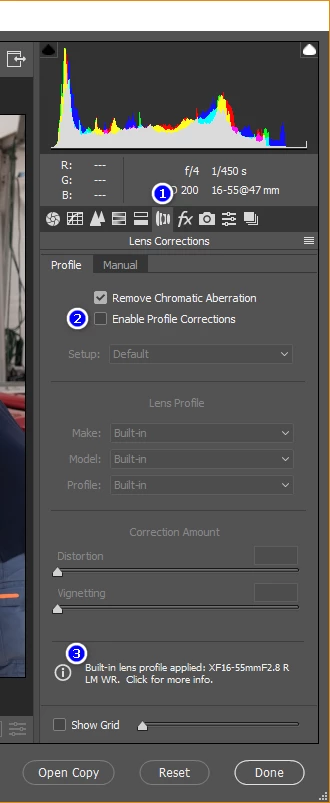
To see the message Jim shows, (1) switch to the lens corrections tab, (2) UNCHECK the Enable Profile Corrections, (3) click the circle-i at next to the built-in-profile message at the bottom.

You might wonder why, if the profiles are built-in, there is still an Enable Profile Corrections selection, which if enabled hides the message about their being a built-in profile.  For a traditional DSLR, there are no built-in profiles, so that checkbox is needed for every photo, and even for a camera with a built-in profile, there is a lens-profile-creator app anyone with sufficient technical abilities can use to create their own lens profile that might have slightly different corrections than the built-in profile supplied by the camera manufacturer and implemented by Adobe.  Without that checkbox people could not use their own profiles.

2 replies

ssprengel
ssprengelCorrect answer
Inspiring
February 17, 2018

To see the message Jim shows, (1) switch to the lens corrections tab, (2) UNCHECK the Enable Profile Corrections, (3) click the circle-i at next to the built-in-profile message at the bottom.

You might wonder why, if the profiles are built-in, there is still an Enable Profile Corrections selection, which if enabled hides the message about their being a built-in profile.  For a traditional DSLR, there are no built-in profiles, so that checkbox is needed for every photo, and even for a camera with a built-in profile, there is a lens-profile-creator app anyone with sufficient technical abilities can use to create their own lens profile that might have slightly different corrections than the built-in profile supplied by the camera manufacturer and implemented by Adobe.  Without that checkbox people could not use their own profiles.

Community Expert
September 17, 2019
A further reason for enabling user selection of an Adobe lens profile, is that an unsupported lens may have been used: a third-party, and/or legacy lens that the camera bodydoes not know about, or where a lens is mounted via a mount adaptor that does not communicate any details of the lens to the camera body. So the camera body has not got any lens correction details, to embed into the Raw file. And an Adobe lens profile (lcp) can be made and then applied on that basis, the same as for other cameras brands that do not offer built-in lens correction.
JP Hess
Inspiring
February 17, 2018

I don't use an Olympus camera. That I downloaded a sample raw image and loaded it into Camera Raw. It has a built-in profile, and here is the message that Camera Raw displays: