Participant
June 14, 2022
Answered

Olympus ORF files open smaller than actual size?

  • June 14, 2022
  • 5 replies
  • 1342 views

When opening Olympus ORF files in Photoshop 2022 (via Adobe Camera RAW), the resutant image size is 5184 x 3456 pixels.

If I open the same file via 'OM Wrokspace'  or 'ON1 Photo Raw', the image is 5184 x 3888 pixels. The thumbnail veiw on my MAC also shows the 'full size' image.

Why is it opening at a reduced size in Photoshop?

Thanks. Neil

This topic has been closed for replies.
Correct answer Jeff Arola

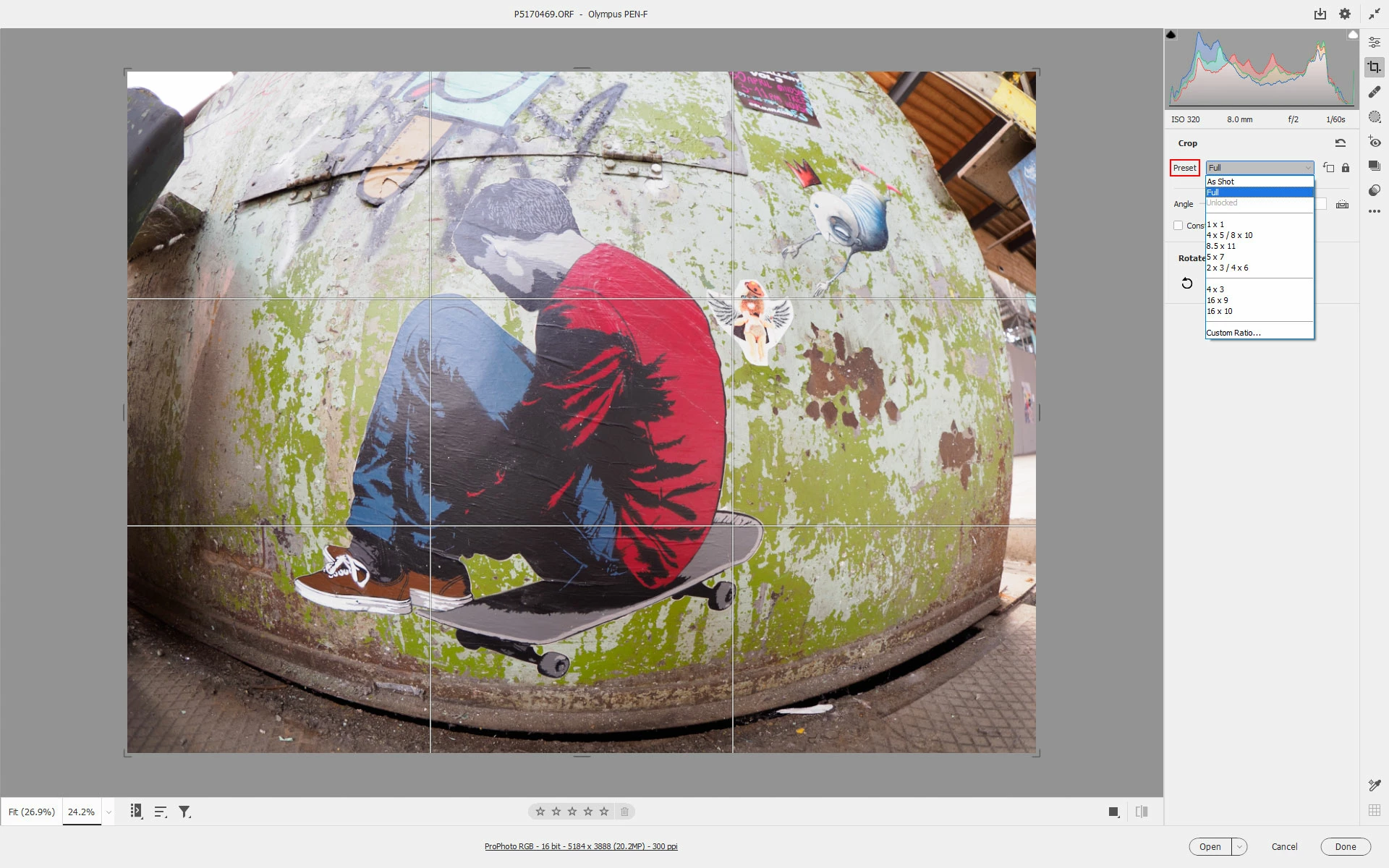
Select the Crop Tool and under Preset chose Full.


5 replies

gener7
Community Expert
Community Expert
June 21, 2022

I would have never guessed. The "As Shot" preset crop was it. Duly noted as correct. Thanks Jeff and Digital Dog.


Participant
June 21, 2022

I will check the camera settings and see if there is anything that can be root cause?

Thanks again for solving a very frustrating problem.

Jeff Arola
Community Expert
Jeff ArolaCommunity ExpertCorrect answer
Community Expert
June 21, 2022

Select the Crop Tool and under Preset chose Full.


Participant
June 21, 2022

Excellent, thank you very much for your help. 

TheDigitalDog
Inspiring
June 15, 2022

At the very least, we need you to upload the original raw to something like Dropbox or similar so we can examine it. 

Author “Color Management for Photographers" & "Photoshop CC Color Management/pluralsight"
Participant
June 20, 2022

https://www.dropbox.com/scl/fo/5pisys4sujyiv8j4mjinc/h?dl=0&rlkey=5hqsfv3vh5z3z4btgja61nfuv


Hopefully you can see ORF example from Olympus Pen F camera.

gener7
Community Expert
Community Expert
June 15, 2022

I've looked and can't find any article that relates to this problem. I've moved the conversation to Camera Raw bugs since the clipping is happening there. The only raw files I use are NEFs, so I can't offer much  else.

gener7
Community Expert
Community Expert
June 14, 2022

If the below hints don't do anything, try the Camera Raw Discussion forum:

https://community.adobe.com/t5/camera-raw/ct-p/ct-camera-raw?page=1&sort=latest_replies&filter=all&lang=all&tabid=discussions


It looks like one side is the same, but the other (3888) is shortened or clipped in ACR.


Two ideas:


Version 14.4 was just released. Would you like to try updating first?


If that doesn't help, Reset Camera Raw. This video explains:

https://www.youtube.com/watch?v=4Y7AzupMPl0

Participant
June 15, 2022

Thank you for your help. I updated my camera Raw to the latest version and reset it. Still getting clipped ORF files. I have no issues with Nikon NEF images. The thumbnail images in Mac Finder are showing the full image, however, the pixel dimensions that appears with the thumbnail are the shortened or clipped version, ie 3456 pixels on the short side of the image. The pixel dimension for the unclipped image (via ON1 Photo Raw) is 3888 pixels?

Screenshot 1 is Mac Finder, 2 is Photoshop Raw, 3 is ON1 Photo Raw.


Any further advice would be very appreciated.