Participant
October 30, 2021
Answered

P: Can't find the crop tool (ACR as a filter)

  • October 30, 2021
  • 2 replies
  • 1409 views

ACR 14.0 The crop tool is missing

This topic has been closed for replies.
Correct answer Rob_Cullen

As stated by @davescm  "...you will not see it in the camera raw filter,"


This is the PLUGIN view that renders the RAW file before it opens in Photoshop-
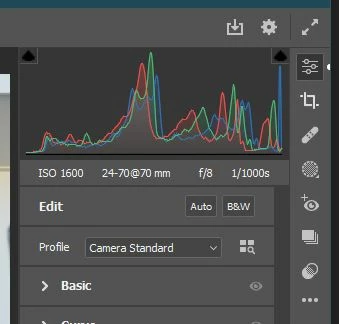
 

This is the Camera Raw FILTER view that you get from the Filter Menu after the image has been 'opened' as RGB in a Ps document window- where you would use the Photoshop Crop Tool [C].
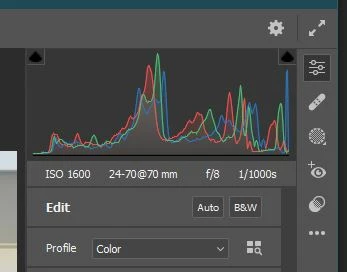
 

Does this explain the difference?


2 replies

Participant
January 15, 2022

I cannot find it on ACR 14.1;  It was there, when I opened the "masking" Icon, last week, but now it has disappeared. ???


davescm
Community Expert
Community Expert
October 30, 2021

It is in Camera Raw 14.0 itself.


Of course you will not see it in the camera raw filter, as you would then use Photoshop's crop tool


Dave

helen_elizabeth2002
Participant
February 7, 2022

I don't see it in mine

Can you please help? Thanks.

Rob_Cullen
Community Expert
Rob_CullenCommunity ExpertCorrect answer
Community Expert
February 7, 2022

As stated by @davescm  "...you will not see it in the camera raw filter,"


This is the PLUGIN view that renders the RAW file before it opens in Photoshop-


This is the Camera Raw FILTER view that you get from the Filter Menu after the image has been 'opened' as RGB in a Ps document window- where you would use the Photoshop Crop Tool [C].


Does this explain the difference?


Regards. My System: Windows-11, Lightroom-Classic 15.0, Photoshop 27.0, ACR 18.0, Lightroom 9.0, Lr-iOS 10.4.0, Bridge 16.0 .


