Alpino
Participating Frequently
August 11, 2021
Answered

Possibility to define a camera-profile as standard?

  • August 11, 2021
  • 1 reply
  • 912 views

Hi,

does anyone know how to set a camera-profile as standard for importing raw-files.

I do not mean presets.

I would change from "Adobe Standard v2" to my individual profile for specific camera.

It should work also in LrC ...

Thanks ...

This topic has been closed for replies.
Correct answer TheDigitalDog
@Alpino wrote:

Thanks, but this will not help.


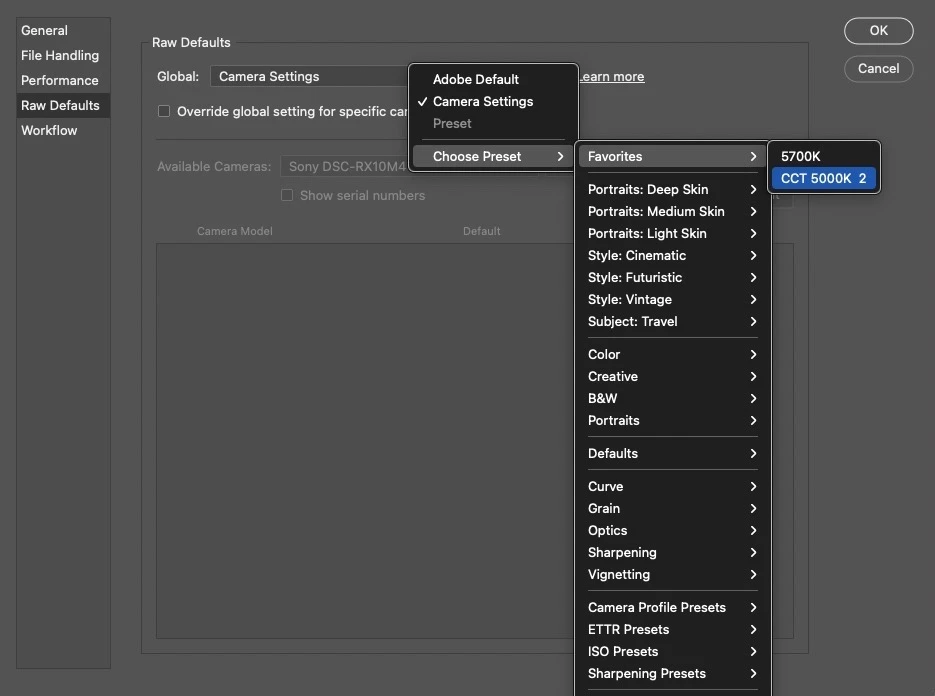
And that's exactly what you can do as seen below (the flyout has two custom DCP camera profiles which I've marked as Favorites but you don't have to do that); select one and done:

1 reply

TheDigitalDog
Inspiring
August 11, 2021
Author “Color Management for Photographers" & "Photoshop CC Color Management/pluralsight"
Alpino
AlpinoAuthor
Participating Frequently
August 12, 2021

Thanks, but this will not help.

In those dialogs there are only presets to select.


What I want, is to select my own DNG camera profile (.dcp) and declare it as a standard for the future, and than maybe add a special preset (film-simulation or what ever) to it.

After importing pictures to LrC, I'm able to select my DCP of course, but not as default before importing.

Preset is not an option.

Legend
August 12, 2021

You make a preset which uses that profile. Leave all other settings at default if you wish.