


Participant
January 3, 2024
Answered

psd washes out color from camer RAW

  • January 3, 2024
  • 3 replies
  • 547 views

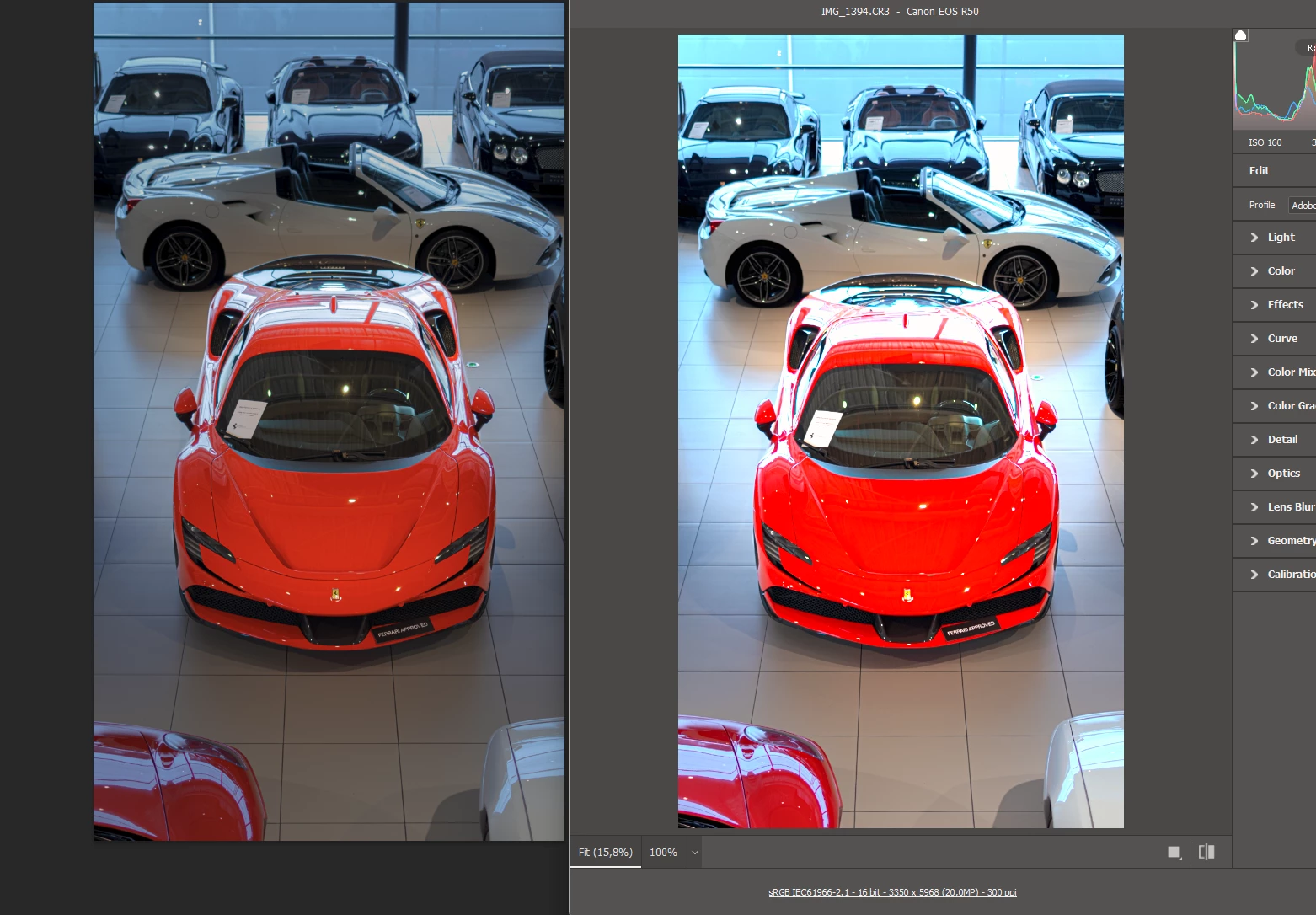
I have read a few post trying to find a solution but nothing seems to work for me. Here is the difference between camera raw and the psd file. I have no idea why but when i make a print screen, camera raw gets very bright. But even then, the difference between the color is quite big. The red is better looking in camera raw than in the psd. I hope someone knows how to fix this.
This topic has been closed for replies.
Correct answer Sebastian van Dongen

Gentleman, thank you for your input, but i have found the solution myself. The previews had a different color because of my HDR enabled on my monitor. Turning of HDR made the preview, PSD and export have the same color. Hope this works for everyone encountering the same problem. Cheers!

3 replies

Sebastian van DongenAuthorCorrect answer
Participant
January 6, 2024

Gentleman, thank you for your input, but i have found the solution myself. The previews had a different color because of my HDR enabled on my monitor. Turning of HDR made the preview, PSD and export have the same color. Hope this works for everyone encountering the same problem. Cheers!

D Fosse
Community Expert
Community Expert
January 6, 2024

Well, I did ask and you said HDR was off...


But anyway, glad you got it sorted 🙂

NB, colourmanagement
Community Expert
Community Expert
January 3, 2024

@Sebastian van Dongen what colourspace are you using when exporting from camera RAW please? It could be that the red is outside the gamut of the selected working colour space.


I hope this helps
neil barstow, colourmanagement net - adobe forum volunteer - co-author: 'getting colour right'
google me "neil barstow colourmanagement" for lots of free articles on colour management
Help others by clicking "Correct Answer" once the question is answered.
Found the answer elsewhere? Share it here. "Upvote" is for useful posts.

Participant
January 3, 2024

I use Adobe Neutral in RAW and sRGB in psd workspace

NB, colourmanagement
Community Expert
Community Expert
January 4, 2024

@Sebastian van Dongen RAW files can contain colour well beyond the boundaries of the sRGB colourspace. As a test why not try exporting the RAW within the Prophoto colourspace and see if the situation persists.


I hope this helps
neil barstow, colourmanagement net - adobe forum volunteer - co-author: 'getting colour right'
google me "neil barstow colourmanagement" for lots of free articles on colour management
Help others by clicking "Correct Answer" if the question is answered.
Found the answer elsewhere? Share it here. "Upvote" is for useful posts.

D Fosse
Community Expert
Community Expert
January 3, 2024

Do you have HDR enabled in ACR?


Can you post a screenshot that shows the histogram in both applications? That will tell if the actual data have been changed, or if it's in the display chain.

Participant
January 3, 2024

Left is from the PSD file and right from camera RAW. HDR in camera RAW is turned of. On my monitor I'm using HDR. I  don't know if this has any effect.