Probably you are right and I'm tricked by the dark interface in Photoshop.
But I swear, my problem appeared recently, before everything was ok. Surely now exist a problem. Indeed I read about Canon files open in Photoshop, but I repeat, everything was ok, with same camera, same laptop.
Jpeg come from my camera, I photographed in raw+jpeg.
Maybe you are right and the problem is GPU, but I don't know exactly what. Also I uninstalled all programs installed recently, no change.
It is possible before this problem, raw files opened in ACR were a little bit darker or brighter (don't bother me). Now, as you can see red/orange colors are affected.
paulp90612957 wrote Jpeg come from my camera, I photographed in raw+jpeg. |
Ah, OK, finally we got to the bottom of it.
Everything here is perfectly normal and working as it should.
As has been pointed out several times, the camera jpeg will not match ACR, it's not supposed to. The camera jpeg is processed in camera, by Canon's camera firmware, and represents Canon's idea of how the image should look.
In ACR you're supposed to create your own rendering. The ACR defaults are just a starting point. The rest is up to you.
There is no such thing as a "correct" or "accurate" rendering of a raw file. You can look up a large number of previous threads here concerning this.


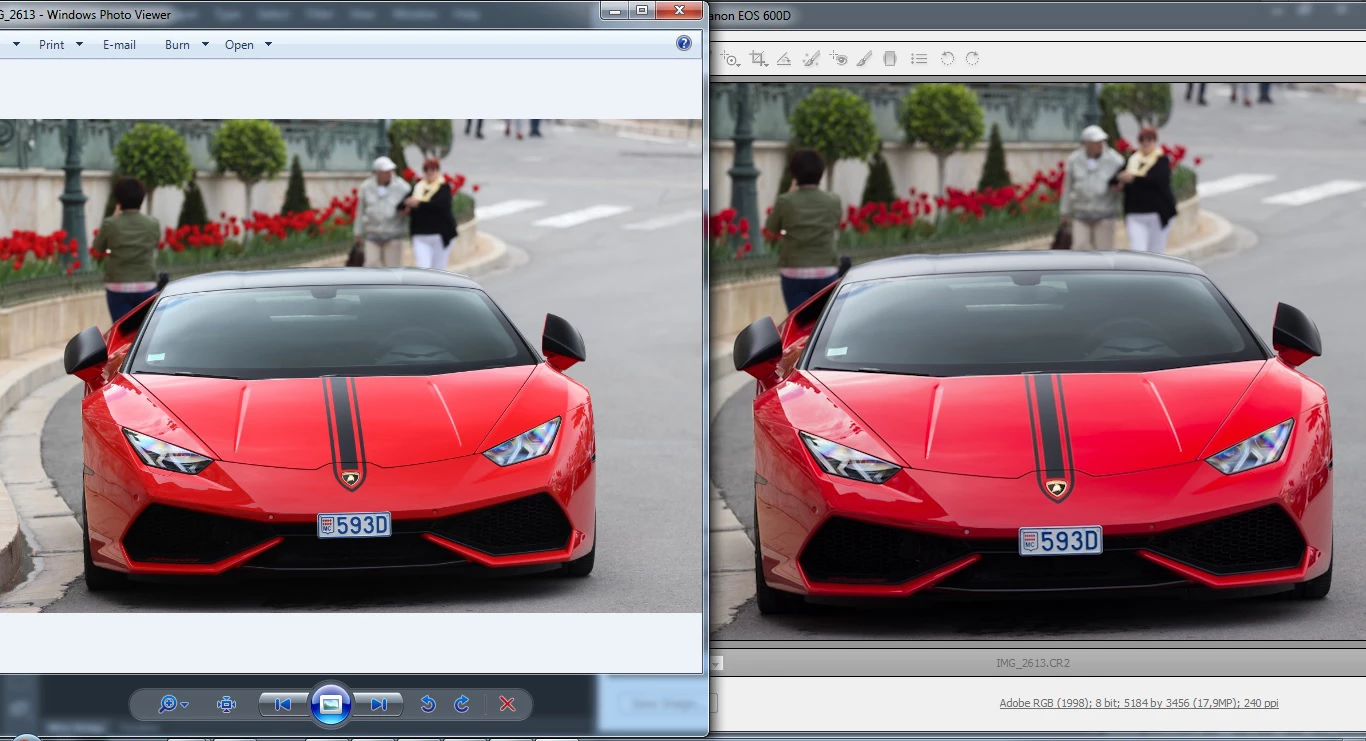 Since a few days I have this problem with raw files. Anyone have any idea? Red go to purple and all pictures are a little bit darker.

 AdChoices