


Participant
April 16, 2018
Answered

RAW from Sony A7III

  • April 16, 2018
  • 3 replies
  • 7065 views

Hello, I have a problem with DNG converter. I downloaded a 10.3 version that should support Raw from Sony A7III, but when I want to upload photos, DNG Converter does not read it. Does anyone know where the problem is? Thanks.

This topic has been closed for replies.
Correct answer JP Hess

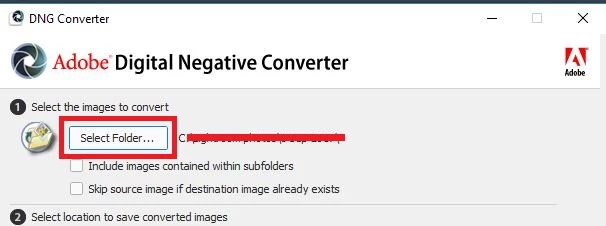
The DNG converter works at the FOLDER level. Choose a folder, but don't open the folder containing the raw images. If you open the folder containing the raw images you will receive a message that there are no images to convert.

3 replies

Participant
June 25, 2018

Hey there!! So I have done this and I have half the images not converting. I have tried about 3 times now and half of my images still aren't converted. Not sure what to do next!!!

ssprengel
Inspiring
June 26, 2018

Since this is your first post on this thread, we don't know anything about your situation except the DNG Converter isn't working how you expect, but only for some of the images.

What camera are the raw images from?

What version of the DNG Converter are you using?

What's different about those images?  Are they created in a "fancy" mode of the camera, like HDR or Pixel-Shift or I don't know what else.  Are they in a different folder from the images that do work?  Is it all of a sequence of images, and none of the next sequence, or are the ones that don't work sprinkled more evenly amongst the ones that do work?

Do you get an error in the DNG Converter for those images?  If so what does it say?

Participant
June 26, 2018

I am using a Sony a7iii, DNG 10.3, nothing is different about the images, they are in the same folder and it's about half of the images. It is the final half of the folder. I'm not getting an error sign, I just select the folder to convert, it converts the images but wont convert the last half.

JP Hess
JP HessCorrect answer
Inspiring
April 16, 2018

The DNG converter works at the FOLDER level. Choose a folder, but don't open the folder containing the raw images. If you open the folder containing the raw images you will receive a message that there are no images to convert.

Participant
April 17, 2018

Thank you very much.

Mohit Goyal
Community Manager
Community Manager
April 16, 2018

Hi philodryas.

Thanks for posting this issue on our forum and we're really sorry for all the trouble caused you. Have you copied the raw images straight from SD card or you have used any images transfer software to move the images from camera to your local machine or hard drive?

Regards,

Mohit