Can you please explain how DNG files will give me more processing capibility in Camera Raw or Photoshop than TIFF files? You mentioned new features like DeNoise and that DNG files allow for better color balance options. I use Photoshop CS6 and Camera Raw 9.1. I don't use Lightroom and never will. I will also never use a newer version of Photoshop and Camera Raw. I am not a Photographer, I just take pictures every once in a while. Hence why I would never pay a subscription for the software.
The only thing I noticed in Camera Raw 9.1 is you have more white balance presets with DNG files. However, you can still customize the white balance just as much with TIFF files. Other than that, I don't see any more processing options with DNG files compared to TIFF files. As I mentioned, I'm rendering the DNG files to TIFF with a 16-bit Adobe RGB color space. I understand I can always re-render the TIFF to sRGB if needed. With all that being said, and with Photoshop CS6 and Camera Raw 9.1 specifically, are there any disadvantages of keeping TIFF instead of DNG, other than file size?
The bottom line is I will not keep two copies of the same image. Thank you,
The only thing I noticed in Camera Raw 9.1 is you have more white balance presets with DNG files. However, you can still customize the white balance just as much with TIFF files.
By @leosantare
That has never been true. Any time a raw/DNG image is rendered to a multichannel image such as RGB TIFF, the color choices are irreversibly restricted. You noticed the presets, but there’s more, as shown in the graphic below.
Raw profiles can no longer be used. Edits are now confined to the image data remaining after conversion to non-raw.
The range of white balance values is converted from (raw) absolute Kelvin to (non-raw) a relative -100 to +100 scale with the value at conversion as the new zero point, and this range is smaller than it was in raw/DNG. So if you convert to TIFF at a white balance too far from what you eventually decide you need, you may not be able to get to the white balance you really want.
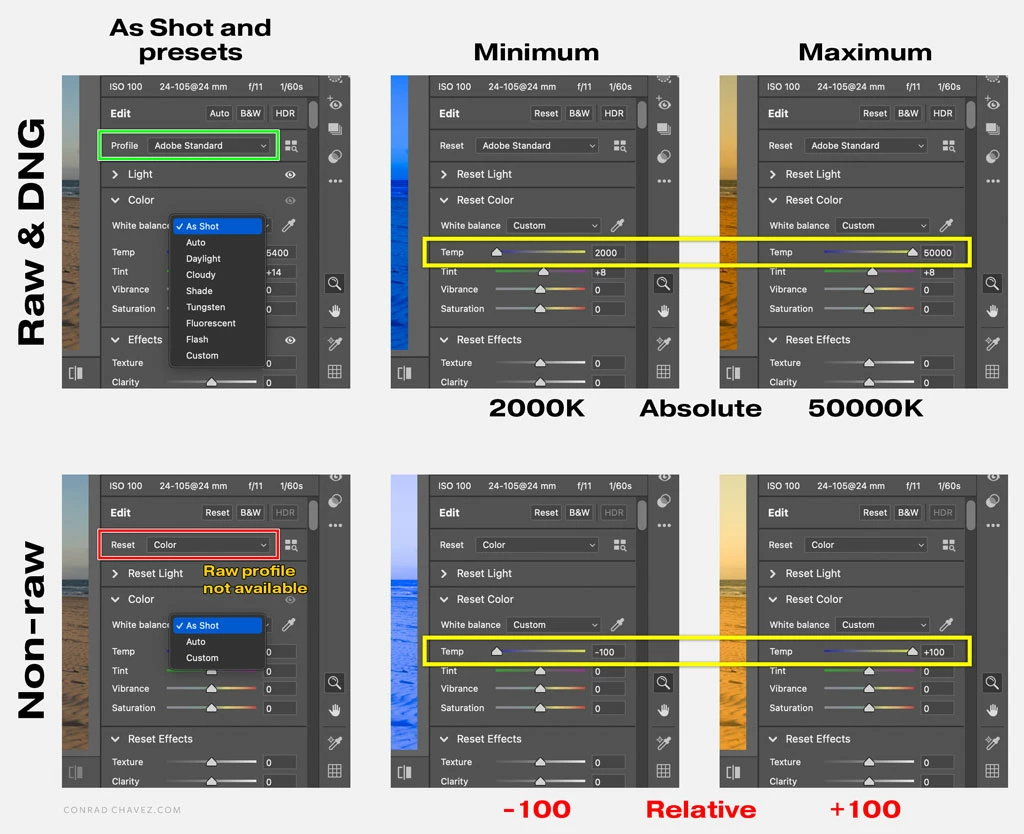
Also, the visual image quality after a large white balance shift in non-raw (such as TIFF) is lower than in raw/DNG. Colors and tones will posterize much sooner in non-raw formats, so you can’t push them as far as you can in raw.
These differences might not matter to you if most of your edits are minor, because a 16 bits/channel image is very high quality (although it uses much more storage than its raw original). But it means if an image needs more drastic edits to rescue it, raw does give you more room to maneuver.





 AdChoices