


Reproducible Fix for Adobe Camera Raw Crashes on Intel Arc Graphics 140T (Core Ultra 7-255H)
Reproducible Fix for Adobe Camera Raw Crashes on Intel Arc Graphics 140T (Core Ultra 7-255H)
(Test platform: Asus ExpertBook B5602)
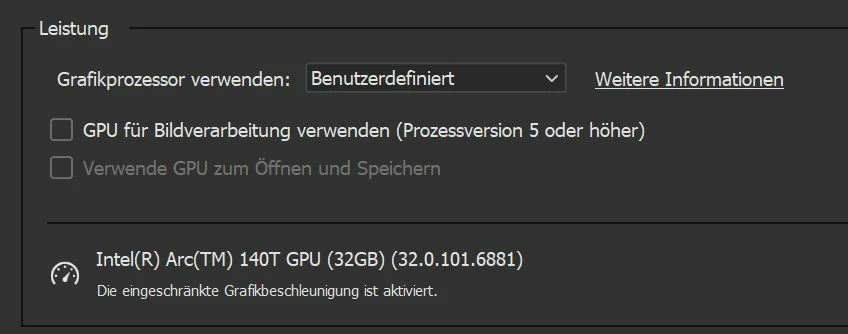
Adobe Camera Raw 17.x can hard-reset / crash the integrated Intel Arc Graphics 140T in Core Ultra laptops (e.g. 255H, 285H) when full GPU acceleration is enabled (AI Denoise).
Fix: Adjust GPU Acceleration: In ACR Preferences, unchecking Use GPU for image processing.
Performance test with 140T (Asus ExpertBook Intel 255H)
All drivers and Software (Intel, Asus, Adobe Bridge/Camera Raw) up to date (June 2025)
Test data: 45 MPixel, ISO 6400 with a Canon R5
Test performed three times with five different images Bridge/Camera Raw AI Denoise from different image series
Battery operation: 100 to 120 seconds/image
Power supley connection: 72 to 76 seconds/image
Perhaps the problem will be resolved with one of the next Intel driver updates. But it's running smoothly as it is.
The iGPU runs at almost 100% continuously and is allocated approx. 3.5 GB RAM. It's therefore unlikely that better drivers would significantly increase the speed. And the performance is probably fine for the 140T at 4.8 TFlops.
Deutsche Kurzfassung:
Problem: ACR 17.x bringt die Intel Arc 140T/155T-iGPU in Core-Ultra-Notebooks zum Absturz, sobald „Automatische“ GPU-Beschleunigung zum Beispiel beim AI Entrauschen läuft.
Lösung: In den ACR-Einstellungen Leistung ➜ Grafikprozessor für Anzeige (Basis) wählen und GPU für Bildverarbeitung abschalten.
 AdChoices