


Known Participant
October 29, 2020
Answered

saving multiple files in ACR 13

  • October 29, 2020
  • 1 reply
  • 376 views

The save button seems to have disappeared in ACR 13?  

I want to save multiple files that I have worked on to a folder, as jpegs and all at a preset size, as I used to in ACR 10.

I have worked on 20 files but can only click done, and save the Nefs, then have to open each one separately in PS to save as jpeg, surely this can't be right!

This topic has been closed for replies.
Correct answer Conrad_C

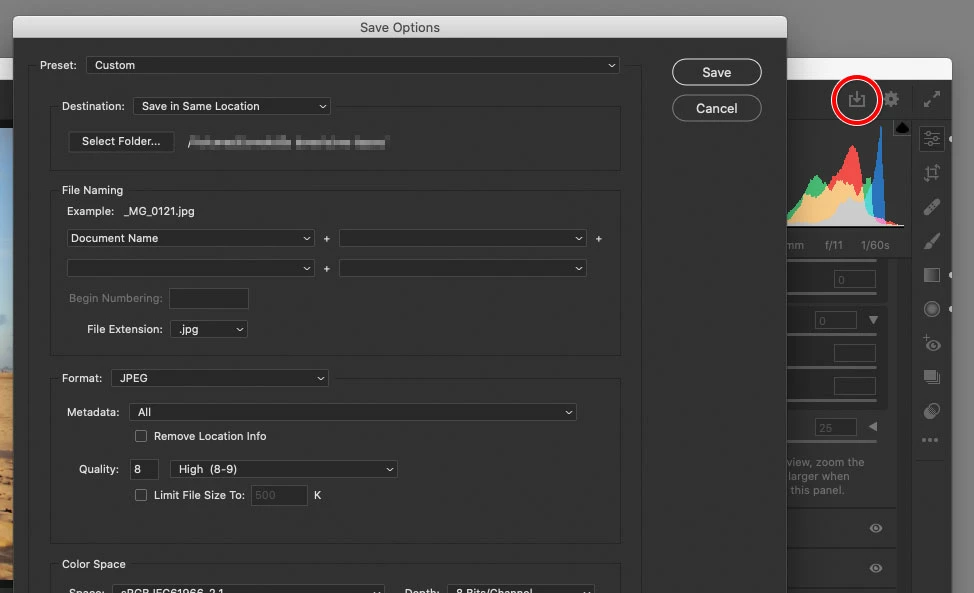
The save button has not disappeared. They moved it up to a more prominent location near the top right corner of Camera Raw, and turned it into the type of Save icon that's increasingly common across Adobe and non-Adobe desktop and mobile apps.


There are several more ways to open the Save Options dialog box:

  • Hold down the filmstrip button next to the zoom percentage at the bottom, and choose Save Image(s).
  • Right-click any selected image in the filmstrip, and choose Save Image(s).
  • Hover the mouse over any selected filmstrip image, and a small vertical icon menu pops up. Either click the middle icon (the Save icon) in the menu, or click the top icon ( … ) and choose Save Image(s).

1 reply

Conrad_C
Community Expert
Conrad_CCommunity ExpertCorrect answer
Community Expert
October 30, 2020

The save button has not disappeared. They moved it up to a more prominent location near the top right corner of Camera Raw, and turned it into the type of Save icon that's increasingly common across Adobe and non-Adobe desktop and mobile apps.


There are several more ways to open the Save Options dialog box:

  • Hold down the filmstrip button next to the zoom percentage at the bottom, and choose Save Image(s).
  • Right-click any selected image in the filmstrip, and choose Save Image(s).
  • Hover the mouse over any selected filmstrip image, and a small vertical icon menu pops up. Either click the middle icon (the Save icon) in the menu, or click the top icon ( … ) and choose Save Image(s).
Known Participant
October 30, 2020

Conrad, thanks for that, I never would have recognised that as a save symbol, though I'd argue that it is more prominent than the great big 'SAVE' button that it used to have on its own in the bottom left-hand corner.

I don't suppose you also know the answer to my question about whether you can move the tools bar away from the right-hand side?


Once again thanks for your help
Derek 🙂