

Known Participant
November 3, 2023
Question

Short cut flow Brush Mask camera RAW Not Working

  • November 3, 2023
  • 1 reply
  • 386 views

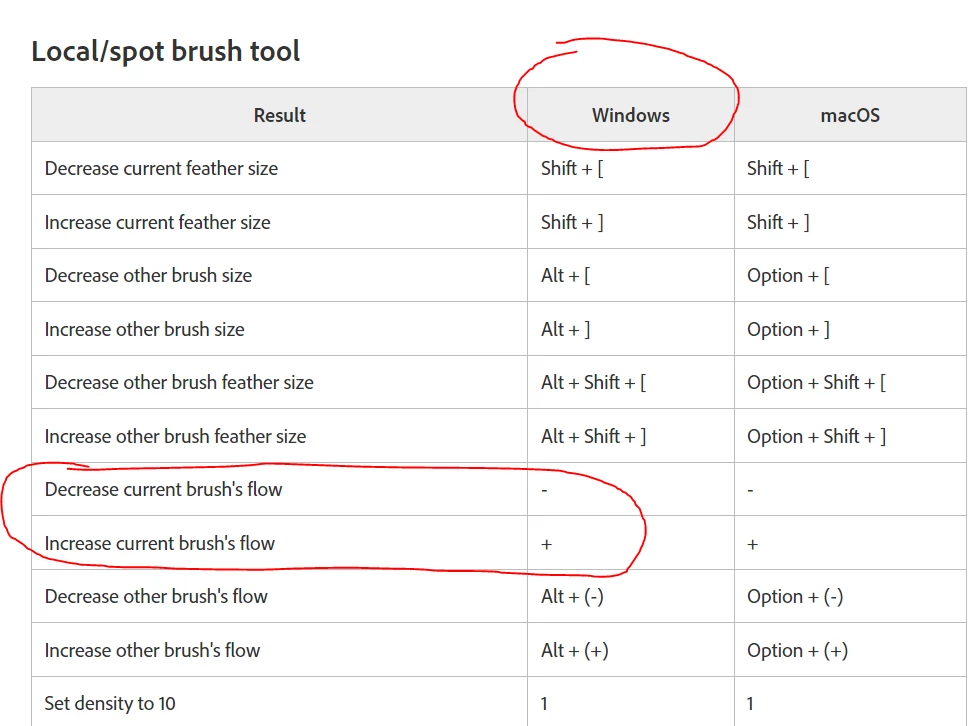
As the picture shows, I read the Camera RAW manual

They say "+" vs "-" will change the FLOW of the brush but on my Camera it doesn't work with this shortcut

This topic has been closed for replies.

1 reply

Rob_Cullen
Community Expert
Community Expert
November 3, 2023

I have not seen the KB shortcut list you screen-clip, but I find this-

In ACR it is  [ALT + (+) ]  and [ALT + (-) ] that alters Brush Flow. (I don't know about the "other brush".)

In Lightroom-Classic  it is Numeric Keys 0-9 that alter Brush Flow.


Regards. My System: Windows-11, Lightroom-Classic 15.0, Photoshop 27.0, ACR 18.0, Lightroom 9.0, Lr-iOS 10.4.0, Bridge 16.0 .
Known Participant
November 3, 2023

My Photoshop settings are default (I reset default to confirm this)

When I hold the ALT + "+" key it will switch to the erase brush, and it will also change the flow of the erase brush

Thank you for your support, I have a project today with about 100 images, it really takes a long time if I control the flow with the mouse

JohanElzenga
Community Expert
Community Expert
November 3, 2023

So what app are we talking about? This is the Lightroom Classic forum, not Photoshop or Camera Raw. Keyboard shortcuts in Camera Raw and Lightroom Classic are not necessarily all the same.


-- Johan W. Elzenga