Participant
November 12, 2017
Answered

since downloading adobe dng converter

  • November 12, 2017
  • 1 reply
  • 623 views

since downloading adobe dng converter to enable continued use of photoshop cs6 [ new camera]. when cs6 opens image to its raw panel,any of the function icons used, their info dialog boxes remain on the screen and can only be removed by quitting photoshop cs6. Dialog boxes perform correctly when using photoshop main panel.Please can anyone help.  Stuart

    This topic has been closed for replies.
    Correct answer Jeff Arola

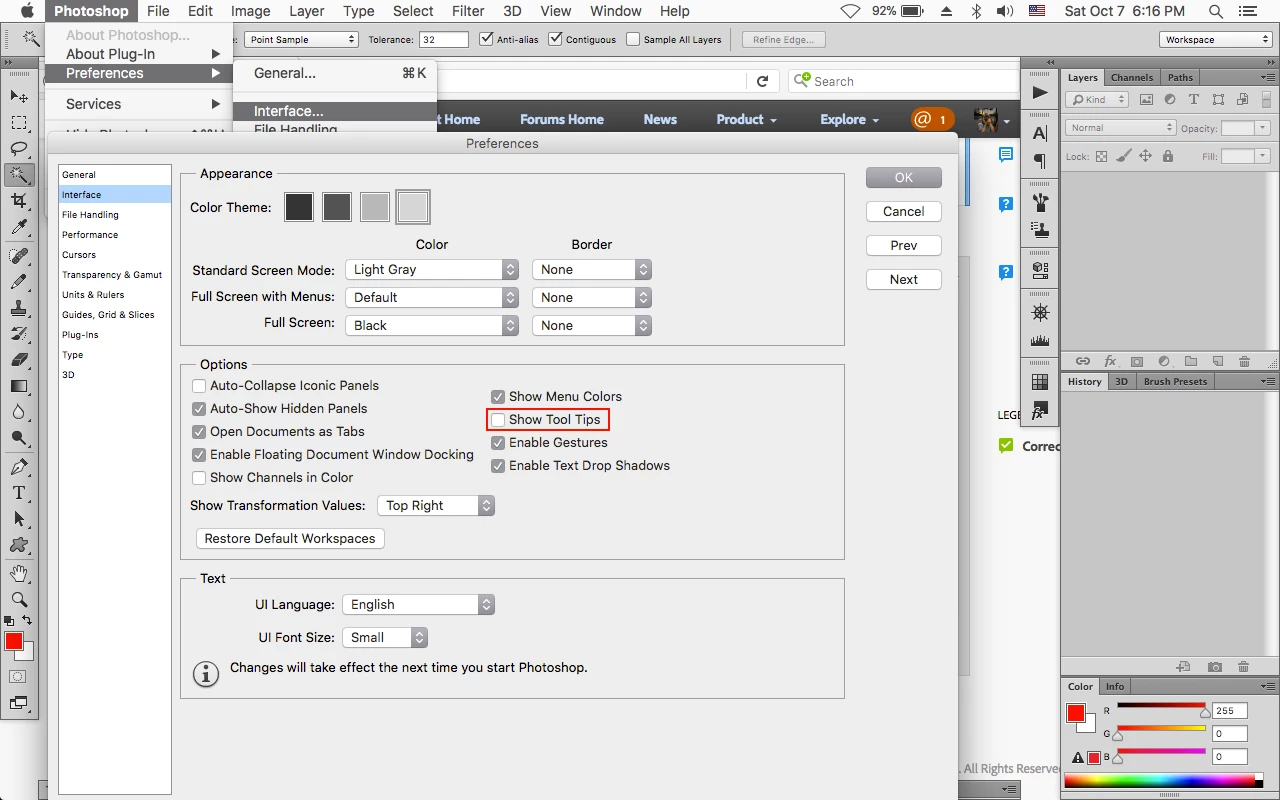
    You can go to Photoshop>Preferences>Interface, uncheck Show Tool Tips and then restart photoshop.

    That should stop the tool tips in camera raw as well when used from within photoshop cs6.

    You can leave a comment over here

    Photoshop save for web and devices ToolTipText keeps on screen after updating to OS X High Sierra | Photoshop Family Cus…

    1 reply

    Jeff Arola
    Community Expert
    Jeff ArolaCommunity ExpertCorrect answer
    Community Expert
    November 14, 2017

    You can go to Photoshop>Preferences>Interface, uncheck Show Tool Tips and then restart photoshop.

    That should stop the tool tips in camera raw as well when used from within photoshop cs6.

    You can leave a comment over here

    Photoshop save for web and devices ToolTipText keeps on screen after updating to OS X High Sierra | Photoshop Family Cus…