


Participant
May 23, 2021
Answered

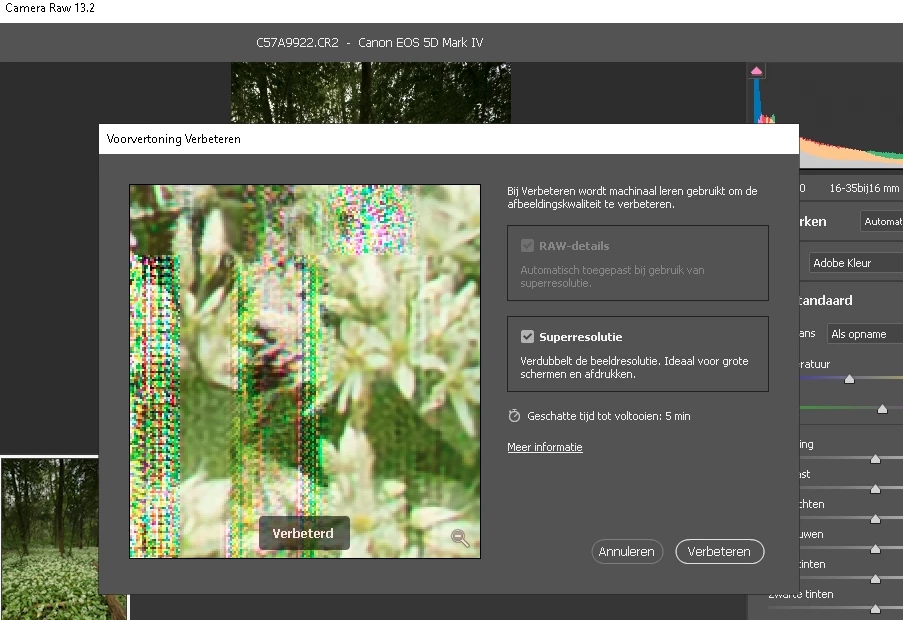
Superresolution strange artifacts

  • May 23, 2021
  • 1 reply
  • 595 views

Hi there,
I am having the same issue. I've read several forums around.
So far i tried to:
- update displaydriver

- uninstall a lot of crap (as it might interfere with the processing)

-dis, and enabled GPU processing

- tried RAW images, .tiff files, .jp(e)g files. all give "same" artifacts 
- tried switching bit depth and color spaces preferences in ACR

It cannot be related to storage (the preview also shows artifacts) so i doubt it is a .dng issue as nothing has been saved to file, during preview! (but ofcourse i can be mistaken)

custom built win10 pro computer 32GB RAM, everything is processed in RAM as i use a RAMDISK.
core-i7 CPU, intel HD530 card

camera type is Canon5D4 (CR2 RAW files)
This topic has been closed for replies.
Correct answer robv77055139

Exactly, i disabled GPU in both ACR and PS preferences, but i still see PS using it in taskmanager. (and when i put on "enhance" in superresolution, it ignores the preferences still using GPU; in this case for creating the preview) 

And it still does not work with GPU disabled. (There seems no way to disable it, PS will still use GPU)

In the OP i didn't measure it with taskmanager. as said there was an update for the driver which i installed.


Hey there, it seems the update has fixed/addressed the issue.
(Im going to test it a bit more, but as far as i can see it does not show artifacts in the preview)

1 reply

TheDigitalDog
Inspiring
May 23, 2021

Even if the preview is OK, the underlying raw could be corrupted so it would be useful if you could upload this as a DNG for others to test. 

Does this show with ALL raws you've tried? 

If so, the other thing to try is recalibrating your display as the display profile could be corrupted.

Author “Color Management for Photographers" & "Photoshop CC Color Management/pluralsight"
Participant
May 23, 2021

yup, all raws, tiffs and jpg's.

How can an underlying raw, tiff or jp(e)g be, or get corrupted if i can open it normally in LR and PS?

My display is calibrated with a SpyderXpro.


I think i found something: i completely disable GPU rendering in PS preferences and Camera RAW preferences. Restarted PS and still it uses the GPU to 100% (which i think causes the issue)

It's an onboard vid card.
I'll try to reproduce on a macmini. The .dng file is attached

Thanx for the tips @TheDigitalDog, much appreciated

TheDigitalDog
Inspiring
May 24, 2021

OK, kind of confused because I read your first post to indicate you tried disabling GPU. That's usually the first thing to do when you see such odd previews, no matter the file type. 


If turning OFF GPU works, it's a GPU bug and you need to contact the manufacturer or find out if there's an updated driver for it. 
Also see: https://helpx.adobe.com/photoshop/kb/acr-gpu-faq.html

Author “Color Management for Photographers" & "Photoshop CC Color Management/pluralsight"