


Unable to save the raw conversion settings.
Mac OSX 10.13.1
CC 2018
Bridge 2018
Simple way to show a fail.From Bridge 2018 I load images into ACR 10.
From Bridge 2018 I load images into ACR 10. (these can be dng, nef, jpg or tiffSelect All
Select All and perform a visual adjustment. Ex: Crop or change exposure 1 full stop
Click Done.
Update Setting begin and then the Error message attached appears.
Click OK and the update settings and Generate Previews continues.
Everything looks normal but upon closer inspection, one image (either 2, 3, or 4) has not changed.
Load it back into Camera Raw and it shows the changes (in this example "Crop" and 1 stop exposure) have been requested.
Click "Done" and the same error appears.
Go to "Tools->Caches->Clear Cache for this folder" and after rebuild and generate previews everything is fine.
I have spoken to Adobe Support for over 3 hours and spent at least that much time on HOLD.
They have logged onto my computer 3 times for at least and hour twice and end up saying "A Higher Power" will contact me.
So far I am still stuck. Adobe Support had me install Bridge CC2017 and it just froze my computer.
Panic... Tried CC2018 again. It Froze too. Unistalled 2017. Immediately back where I began.
Every time I make a change to a file in a folder I have to rebuild the cache for that folder which may contain a couple of hundred Raw dng files.
Waiting on Adobe for a Solution.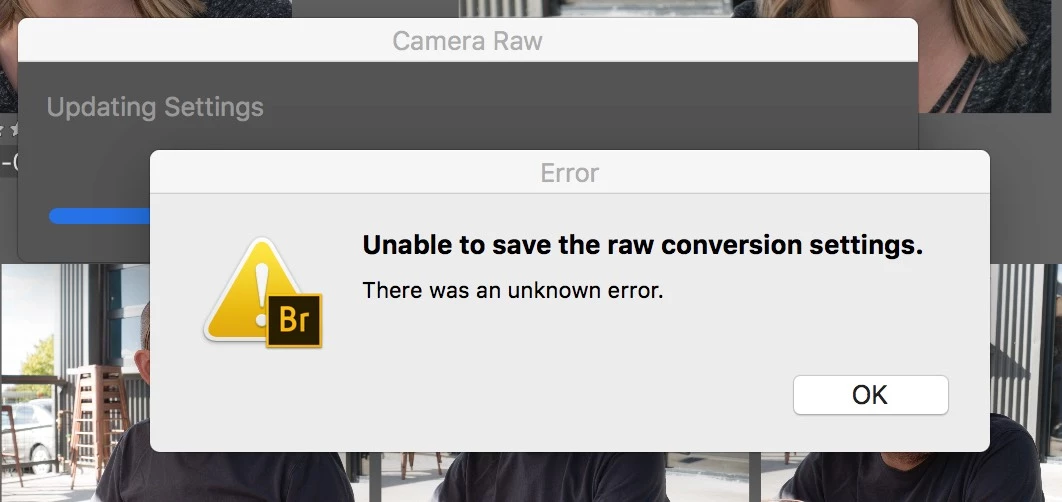

 AdChoices