
Inspiring
April 2, 2021
Question

Unrecoverable Error while using the Enhance feature in Camera Raw 13.2 on Windows 10

  • April 2, 2021
  • 5 replies
  • 3320 views

When opening a RAW image in Camera Raw 13.2 my GPU encounters an "unrecoverable error". I've get the same error with each of .CR2, .CR3 & .ARW files. Photoshop 22.3.0
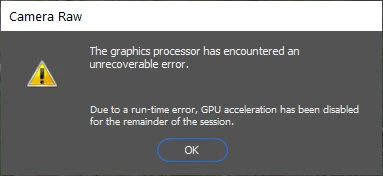


Here are my Computer specs:

System Model: Alienware Area-51m R2
Processor: Intel(R) Core(TM) i7-10700K CPU @ 3.80GHz, 3792 Mhz, 8 Core(s), 16 Logical Processor(s)
Installed Memory (RAM) 32.0 GB
Display Adapter: NVIDIA GeForce RTX 2070 Super (8GB), Nvidia Studio Driver 461.92
Display: 1920x1080 144 hertz
Storage (8TB Total):
OS Drive: PM981a NVMe SAMSUNG 2048GB
Data Drive1: Samsung SSD 970 EVO Plus 2TB
Data Drive2: Samsung SSD 860 EVO 4TB


Any suggestions would be appreciated.


...Jerry


{Thread title edited by moderator}


This topic has been closed for replies.

5 replies

Jerry_aAuthor
Inspiring
July 25, 2021

I just installed the latest Nvidia Studio Driver, 471.41 and the problem persists. I anyone listening to this thread?

...Jerry

Inspiring
July 26, 2021

I am... I have yet to try it with the latest drivers, but will today. Interestingly it works fine in Lightroom, which shares some code with Camera Raw.


P

Jerry_aAuthor
Inspiring
July 26, 2021

Hooray! It does work in Lightroom. I can live with that!

...Jerry

Inspiring
June 22, 2021

This is happening to me as well. I'm on a Windows PC (fully updated) with Photoshop & Camera RAW fully updated, and only have 1 GPU (Nvidia 3070) installed with fresh, and up to date drivers. I'm unable to use the Enhance function in Camera Raw with the same error message as @Jerry_a 

Jerry_aAuthor
Inspiring
June 29, 2021

I now have Adobe Camera Raw 13.3 installed and continue to experience this problem. As a reminder, here is my computer configuration:


System Model: Alienware Area-51m R2
Processor: Intel(R) Core(TM) i7-10700K CPU @ 3.80GHz, 3792 Mhz, 8 Core(s), 16 Logical Processor(s)
Installed Memory (RAM) 32.0 GB
Display Adapter: NVIDIA GeForce RTX 2070 Super (8GB), Nvidia Studio Driver 471.11
Display: 1920x1080 144 hertz
Storage (8TB Total):
OS Drive: PM981a NVMe SAMSUNG 2048GB
Data Drive1: Samsung SSD 970 EVO Plus 2TB
Data Drive2: Samsung SSD 860 EVO 4TB


The Nvidia Studio driver 471.11 is the latest update. I've tried various older drivers without success. Attached is my configuration information from Photoshop CC -> Help -> System Info.


Is there any other info I can provide to help resolve this issue?


Thanks, Jerry

nikunj.m
Community Manager
Community Manager
April 2, 2021

Hi,


We're sorry about the trouble with Camera Raw due to the error you're getting regarding the drivers. Have you tried re-installing the NVIDIA drivers or installing an older version of the drivers to check if you experience the same behavior? If not please try that to check if that helps.


You can also try the steps suggested here: https://helpx.adobe.com/photoshop/kb/troubleshoot-gpu-graphics-card.html


Please let us know how it goes!

Regards,

Nikunj

Jerry_aAuthor
Inspiring
April 2, 2021

Thanks for the prompt reply. Before I go to the trouble of reverting to an old driver, could the following be a clue to my problem?

...Jerry

D Fosse
Community Expert
Community Expert
April 5, 2021

Yes it could indeed.


You need to find a way to disable the integrated Intel GPU. That's what's giving you problems.


Laptops with dual GPUs is a big problem with Adobe applications (and probably other advanced software). GPU switching looks like a good idea on paper. The problem is that Photoshop/ACR - including super resolution - uses the GPU for actual data processing, and the result returned for further processing.


As you can imagine, you can't send data to one GPU and expect to get it back from the other. There can only be one GPU in this equation.

Chuck Uebele
Community Expert
Community Expert
April 2, 2021

Moved to the Camera Raw forum, from the Photoshop forum.

Jerry_aAuthor
Inspiring
April 2, 2021

If it wasn't clear in the title, this occurs with I try to invoke the new "Enhance" feature.

...Jerry