


Participant
October 30, 2018
Answered

Where are the user presets in ACR?

  • October 30, 2018
  • 2 replies
  • 870 views

HI,

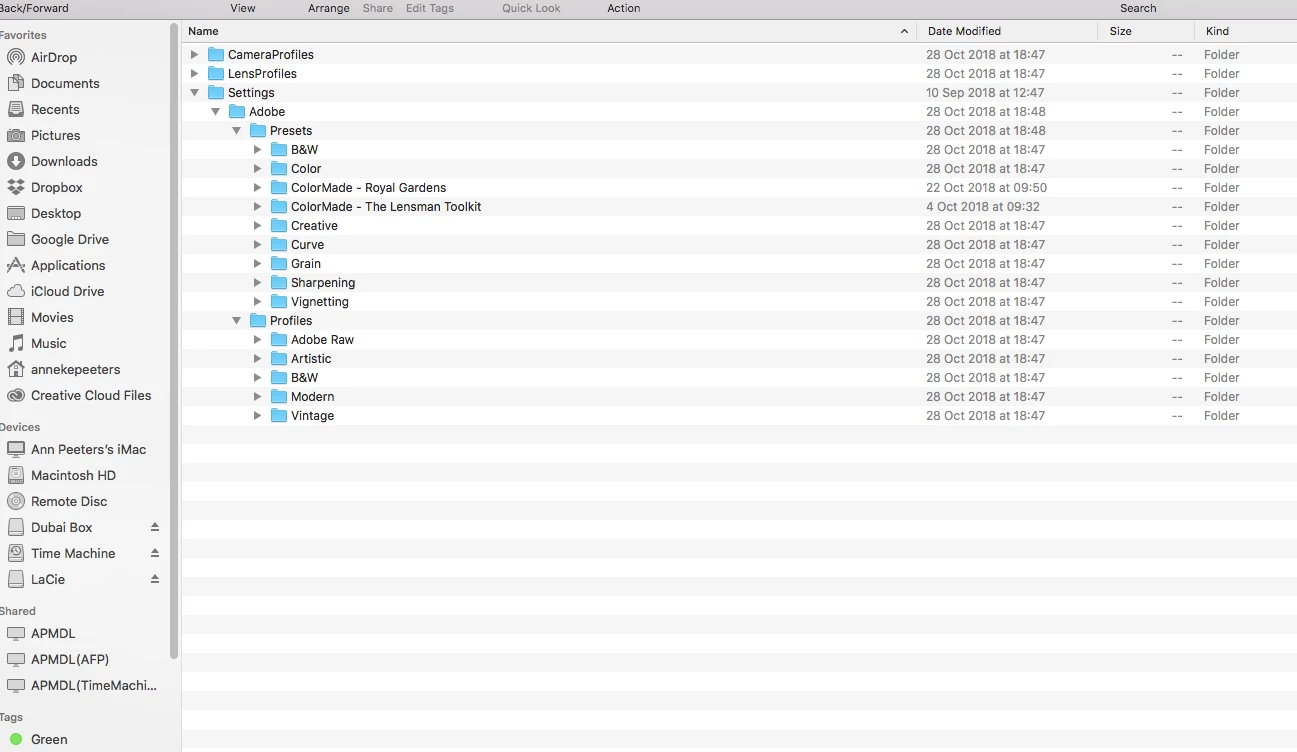
So I can't find my user presets in the designated folder.

Only the standard ones seem to be there. I want to copy my own presets to another computer since we dont have the option to sync anymore.

But where are my own XMP files?
    This topic has been closed for replies.
    Correct answer danielsenphoto

    There are two different Library folders. Unless I am wrong, the subfolders in your screenshot are in the computer's Library folder. You need to get to your user's Library folder which is hidden (unless you e.g. use the method I mentioned).

    2 replies

    Participant
    October 31, 2018

    Thanks for that.

    You are right! There are two folders and yes the only way to get in it it by holding down the option key while opening the go menu.  I have successfully located the files.

    I've created an alias to my desktop now for easy acces so I can copy them to my other computer.
    Thanks a lot! This will save me lots of time. Too bad you can't sync to both computers anymore, hope the feature will come back.

    danielsenphoto
    Participant
    October 30, 2018

    User presets should be in this folder (mac): usr/Library/Application Support/Adobe/Camera Raw/Settings

    An easy way to find your usr/Library-folder is to keep down 'option' key while Finder's 'Go' menu is open.

    Participant
    October 30, 2018

    Hi,

    Thanks but thats the folder of the print screen above. All the adobe and imported presets are there except for the ones I have made myself.

    Cant find those XMP files anywhere.

    danielsenphoto
    danielsenphotoCorrect answer
    Participant
    October 31, 2018

    There are two different Library folders. Unless I am wrong, the subfolders in your screenshot are in the computer's Library folder. You need to get to your user's Library folder which is hidden (unless you e.g. use the method I mentioned).