Known Participant
October 14, 2021
Answered

Where is Targeted Adjustment tool in Camera Raw? v13.4

  • October 14, 2021
  • 1 reply
  • 602 views

Where is Targeted Adjustment tool in Camera Raw? v13.4

This topic has been closed for replies.
Correct answer Rob_Cullen

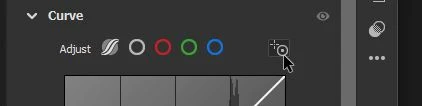
In the Tone Curve-  (The  'circle+'  icon)

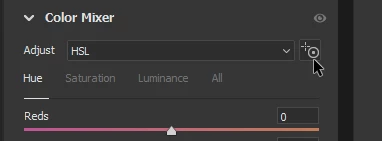
In the Color Mixer-


1 reply

Rob_Cullen
Community Expert
Rob_CullenCommunity ExpertCorrect answer
Community Expert
October 14, 2021

In the Tone Curve-  (The  'circle+'  icon)

In the Color Mixer-


Regards. My System: Windows-11, Lightroom-Classic 15.0, Photoshop 27.0, ACR 18.0, Lightroom 9.0, Lr-iOS 10.4.0, Bridge 16.0 .
Known Participant
October 14, 2021

Thanks. I could not figure out where they put HSL. Didn't think to check the pop up menu in the color mixer. I am not a fan of this new layout, prefered the tads instead of clicking the arrow to reveal the controls.