Legend
October 25, 2018
Answered

Which Camera Profile files support Panasonic DMC-GF1

  • October 25, 2018
  • 1 reply
  • 1204 views

I am confused.

I have to process some RAW images, taken with a Panasonic DMC-GF1 (yeah, it is an oldie, but that's beyond my control).

When the image opens in the Camera RAW plug-in 10.5, I see the warning stating that the camera profile is not installed.

Looking in /Users/<myname>/Library/Application Support/Adobe/CameraRAW/CameraProfiles/Camera/ I do indeed not see a folder Panasonic DMC-GF1 (or similar). This would then explain the warning.

Now, on the page listing the supported cameras in CameraRAW, the Panasonic DMC-GF1 is listed.

So, where are these profiles??

Are they hidden in another folder, or is there a camera whose profiles do support the DMC-GF1?

Confusion totale.

Otherwise, where can I get those profiles? Can they be found on the Adobe FTP Server?

Any hint and indicator to find those profiles is highly appreciated.

Max.

This topic has been closed for replies.
Correct answer Jeff Arola

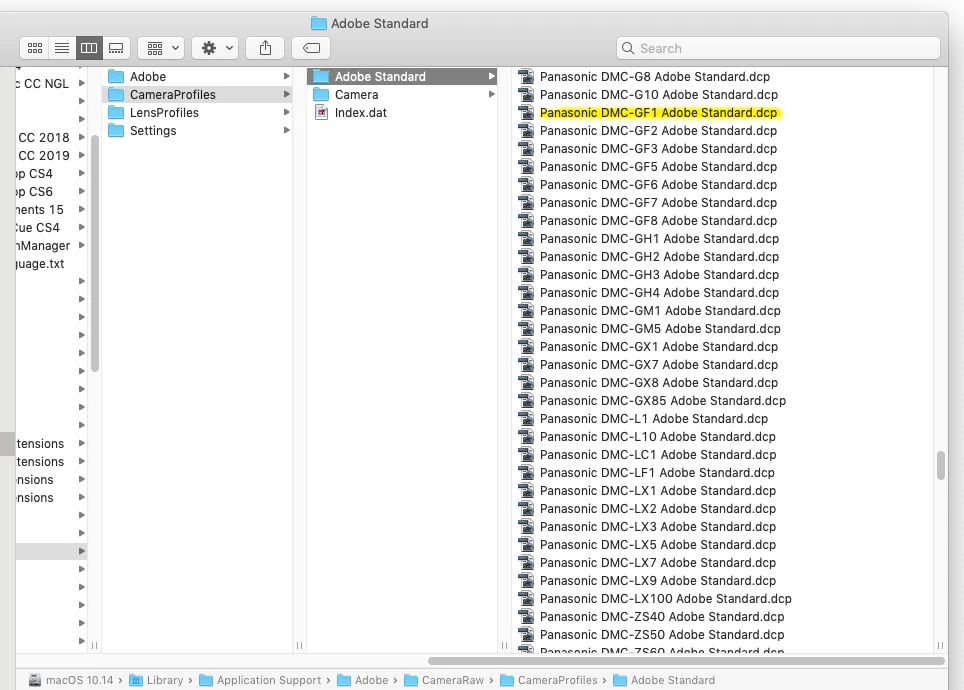
Look in

‎⁨macOS HD ▸ ⁨Library⁩ ▸ ⁨Application Support⁩ ▸ ⁨Adobe⁩ ▸ ⁨CameraRaw⁩ ▸ ⁨CameraProfiles⁩ ▸ ⁨Adobe Standard⁩

If you don't see it, install the adobe dng converter 11 to reinstall the camera profiles.

Adobe - Adobe Camera Raw and DNG Converter : For Macintosh : Adobe DNG Converter 11.0

1 reply

Chuck Uebele
Community Expert
Community Expert
October 25, 2018

If it's that old of a camera and few people use it, profiles might never have been created for it, as profiles are relatively new.

maxwyssAuthor
Legend
October 25, 2018

But then, how would Adobe dare to state that the camera is supported?

Or am I naive??

Chuck Uebele
Community Expert
Community Expert
October 25, 2018

A supported camera is much different than a camera profile. A supported camera means that you can open that camera's imaged in Camera Raw. It doesn't mean they have a profile for it.