


Participating Frequently
October 11, 2026
Question

Why can't I get the reflection removal to work on a standard glass window?

I took this picture yesterday afternoon.  I forgot to bring a polarizing filter and hoped ACR would help me but I am struggling to find any real value in the parameters I have used.  I really want the reflection of the car removed..
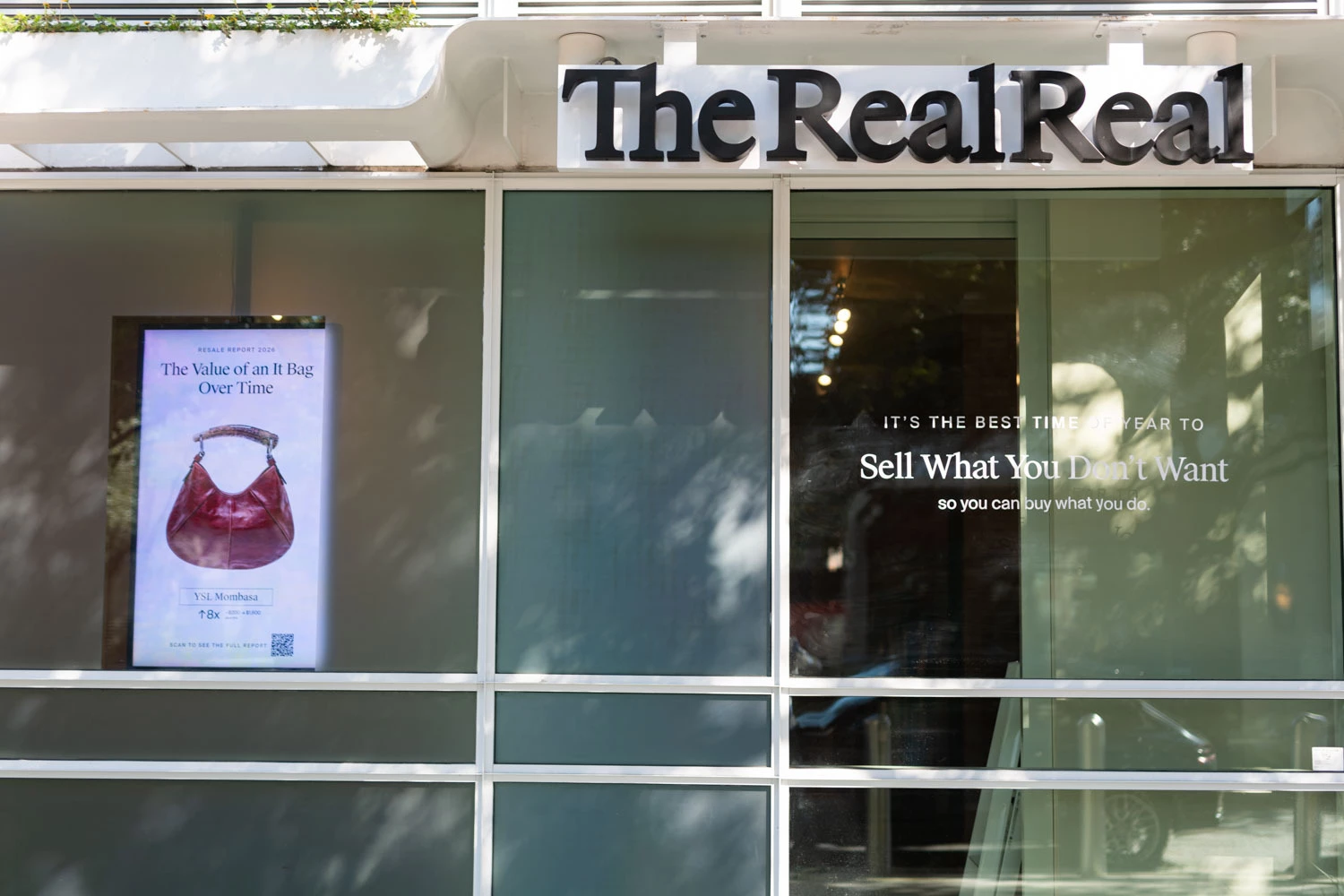
 

    2 replies

    Conrad_C
    Community Expert
    Community Expert
    October 13, 2026

    The biggest factor might be the nature of the photo. There’s something about the current implementation of Reflection Removal that Adobe has mentioned publicly, but most people don’t notice: It works best when the reflection covers the entire image. That is not true for this image, so reflection removal may not work optimally on it.

    In the original Adobe blog article about this feature (Removing window reflections in Adobe Camera Raw), Adobe says:

    This first iteration of the tech is designed to address only one kind of reflection — from plate glass windows that cover most or all of your field of view. It's not designed to remove reflections from windows that are small or far away, or where the window frame is within the field of view, or reflections from objects like wine glasses, car bodies, or clouds reflected in a lake. We might address some of these applications in later updates.


    The image posted here has windows that are only part of the image and their window frames are visible, so that causes problems with how Reflection Removal is currently trained.

    Here are some other examples others have posted here that the current version of Reflection Removal doesn’t work well with, for similar reasons:

    • Reflection in the glass of a photo frame that is only a small part of the photo, in the middle of a wall
    • Reflections in eyeglasses
    • Reflections in bus shelter glass

    Until Adobe can train Reflection Removal to better understand reflections that don’t cover the entire image area, the feature isn’t going to work as well on images like this one where the window glass is just part of the image, and the rest of it is a building without reflections.

    It does work great for images where the camera is so close to the glass that you can’t see the edges of the glass, whether they’re street windows or museum glass cases.

    Translate
    CORCTON34033231
    Community Expert
    Community Expert
    October 13, 2026

    Hi — with Reflections, the slider itself is the part that trips up most people, so it's worth checking first:


    In the Remove panel, select Distraction Removal > Reflections > Apply and let Camera Raw detect the reflection. At +100 you should see the image with the reflection removed, and at -100 you see the reflection layer on its own. But sometimes it's reversed, and +100 actually shows the reflection instead — in that case, drag the slider to -100 to view the cleaned-up image.


    Also, when judging the result, set Quality above Preview (Preview is only a low-resolution result), and apply Reflections before your other edits — Adobe recommends reflection removal as a first step for best results.


    Official guide: https://helpx.adobe.com/camera-raw/desktop/ai-and-generative-features/remove-reflections.html


    One limit to be aware of: the tool separates what's seen through the glass from the reflected layer, so if the car's reflection is much brighter than the scene behind the glass, it may not fully recover what was hidden behind it.

    Translate