

Inspiring
May 27, 2026
Answered

Why doesn’t the new refine edge in ACR support ‘select object’ masks?

  • May 27, 2026
  • 6 replies
  • 11 views

New masking in ACR has refine edge for AI masks, such as people, as shown (circled in red)
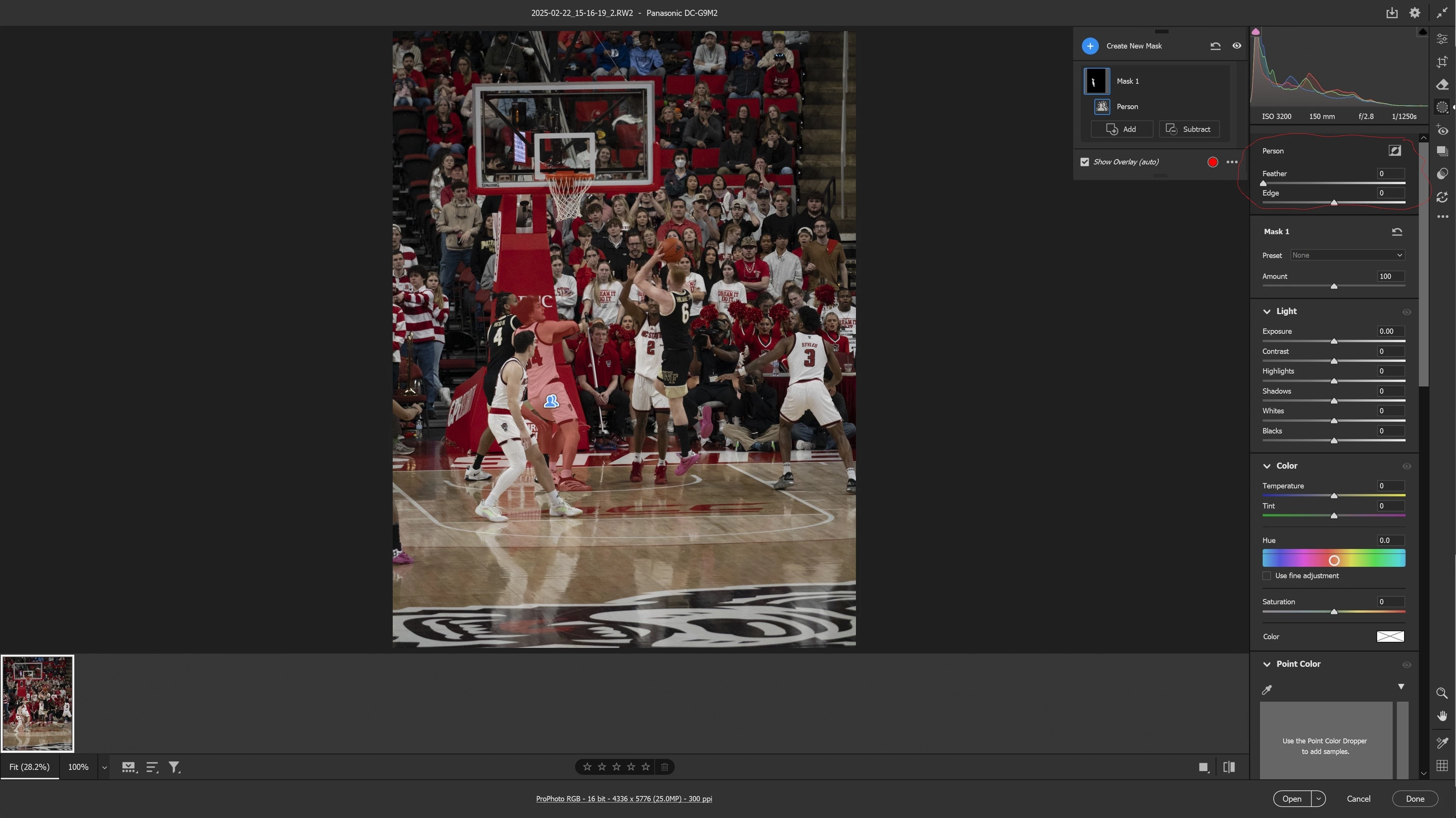
 

People mask

However, an object mask does not have that capability 
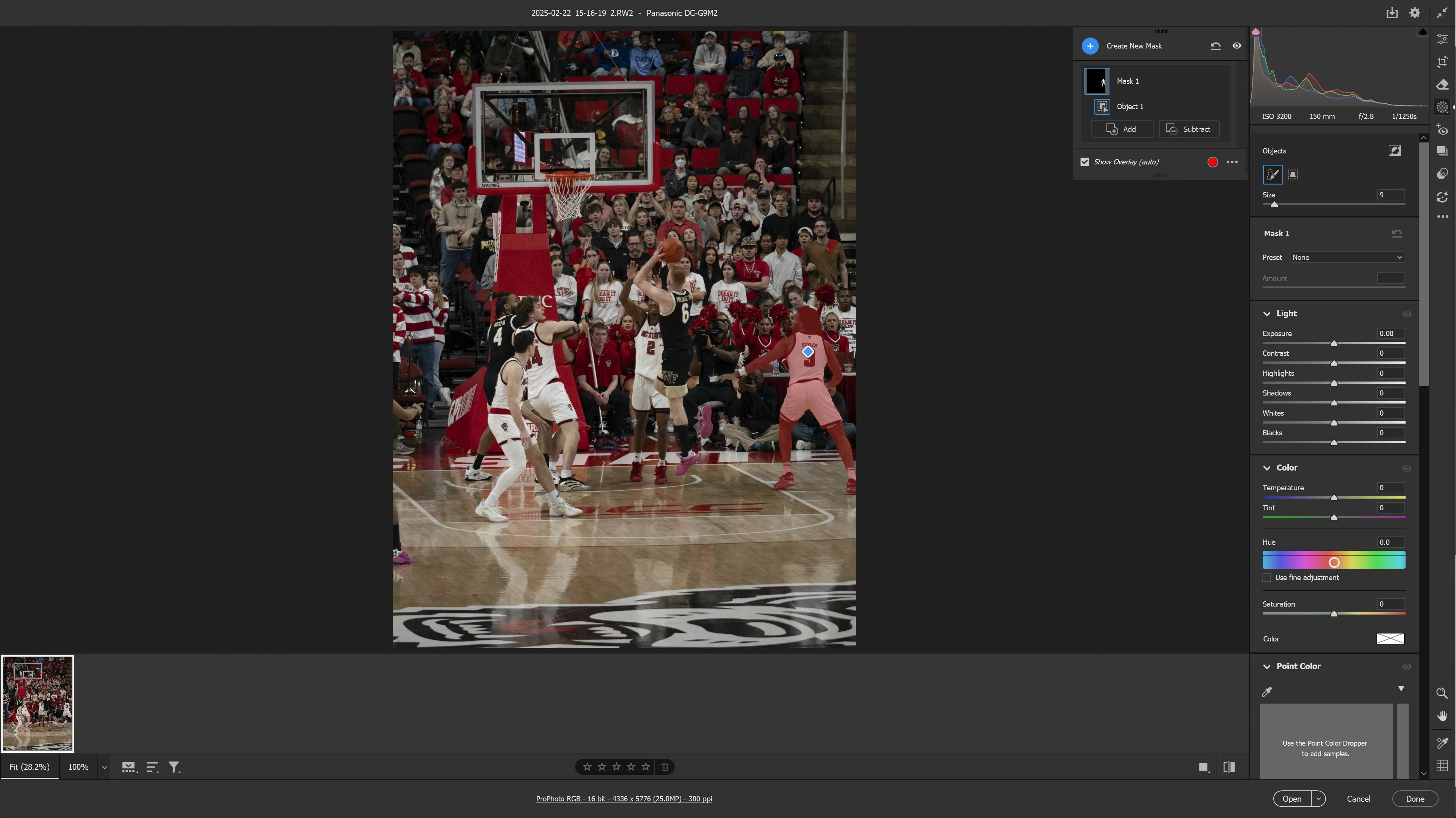
Object mask


    Correct answer Rikk Flohr_Photography

    We are planning to implement that as a future enhancement. Stand by!

    6 replies

    Rikk Flohr_Photography
    Community Manager
    May 27, 2026

    We are planning to implement that as a future enhancement. Stand by!

    Rikk Flohr: Adobe Photography Org
    jrsforumsAuthor
    Inspiring
    May 27, 2026

    YES!! Thanks.  And, as soon as possible, in Lightroom.

    Conrad_C
    Community Expert
    Community Expert
    May 26, 2026

    It’s a good question. I don’t know the real answer, but my guess is those features are so new that they want us to poke at them and find any issues in this initial limited implementation before they start propagating these new options to other mask types and then over to Lightroom. 


    By the way, in the future this type of question might be better asked over in the Camera Raw forum. That could be why people got confused here, thinking it had to do with the masks in Photoshop, where Feather has already been in mask Properties for some time and both have existed in the Select and Mask dialog box for many years.


    Also, the thread title might have confused people because there is no feature labeled Refine Edge in Camera Raw/Lightroom. That’s a feature of the Select and Mask dialog box in Photoshop.

    jrsforumsAuthor
    Inspiring
    May 26, 2026

    SORRY….I just realized I was not specific in my posting that I was talking about the new refine mask in ACR

    davescm
    Community Expert
    Community Expert
    May 26, 2026

    If you go into the Select and Mask workspace, which you can do from any mask, you can refine the edge from there.

    Dave

    jrsforumsAuthor
    Inspiring
    May 26, 2026

    That’s true…but the point is to be able to do it in ACR, like the AI masks….and in Lightroom, when it moves there….and avoid PS

    plus, I’m not sure the ACR mask would be available in PS, would it? 
     

    SORRY….I just realized I was not specific in my posting that I was talking about the new refine mask in ACR

    davescm
    Community Expert
    Community Expert
    May 27, 2026

    No problem - it is clear now.
    Dave

    Sameer K
    Community Manager
    Community Manager
    May 26, 2026

    Hey, @jrsforums. Welcome to the Photoshop Community. We'll need more info to help you figure this out.


    Please share more details, including the Photoshop version, operating system information, screenshots, and video recordings of what you see.

    At this point, the given information is insufficient for me to assist you.


    Thanks!
    Sameer K

    (Type '@' and type my name to mention me when you reply)

    jrsforumsAuthor
    Inspiring
    May 26, 2026

    Win 11, PS 27.7.0, ACR 18.3.1

    New masking in ACR has refine edge for AI masks, such as people, as shown (circled in red)


    For an object mask, no refine edge is available


    jrsforumsAuthor
    Inspiring
    May 25, 2026

    I love the addition of edge/feather for AI masks, such a people, landscape, sky, etc.  why is it not available for ‘select object’?

